Translate

Showing posts with label TDD. Show all posts

Monday, February 11, 2019

BDD – An Introduction and Usage Guide

Source: https://dzone.com/articles/tddbdd-an-introduction-amp-usage-guide

Take a look at how you can use Cucumber to ensure your BDD methods are up to par.


When I was asked to implement TDD/BDD in our work, I searched a lot for a single-page document/site but was not able to find one. Though there are plenty of very good resources available on this topic, I have decided to create a single article to show both of these 2 approaches hands-on.

Overview

In Agile development, organizations want to be market ready for new products, features, and functionalities within a very small period of time. But traditional testing methodologies cannot ensure this. To keep up the pace with this rapid development in an Agile environment, a few new design practices for Software Testing were born. We can name a few like ATDD, TDD, BDD, or Integration Testing, but we will limit our discussion to TDD & BDD which are the most used practice nowadays.

BDD (Behavior-Driven Development)

Chronologically, BDD practice comes after TDD came in action. Basically, BDD is an evolution over TDD. The purpose of this design is to make a bridge between business analyst and development teams through a common language which is purely based on business requirements and Agile practice.
BDD follows a similar process as TDD but it follows an Outside-In approach as opposed to TDD. Here, test cases are written at the start of the development phase. A test case has to be run to fail, the developer needs to write the business logic code, then run the test cases again. The same is true for TDD. But the difference here is the common language used for describing the functionality. Let's explain this in an Agile way.
When a requirement comes to technology teams for implementation, some business analyst/Product Owner creates a feature in a collaborative tool like Jira or RTC. Now every feature will have few scenarios to be implemented which are known as the acceptance criteria. The BDD approach takes the acceptance criteria to be implemented as test cases. So, while a new feature is being implemented, BDD makes sure all the scenarios are converted to proper test cases. Thus, the greatest advantages of the BDD approach is to fill the gaps between non-technical teams and development teams.     
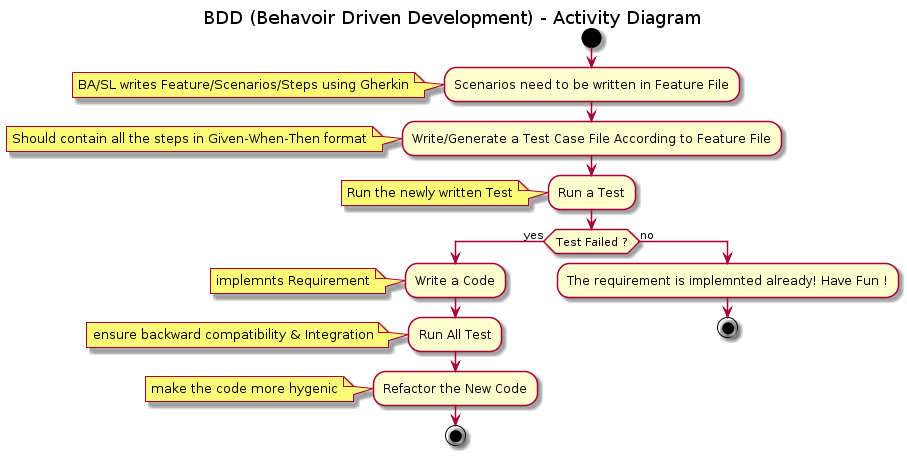
Image title

BDD Framework Overview

There are a couple of available frameworks in the open source community for BDD practice, like JBehave, RSpec, GivWenZen, and Cucumber, to name a few. But we will take Cucumber as it’s the most common framework for Spring Boot and microservices architectures.

Cucumber

Cucumber is an open source library available for most language platforms, but we will concentrate our discussion with only Java.
Before deep dive into Cucumber with examples, we need to understand few basics of it. Basically, Cucumber reads executable specifications written in plain text and validates that the software does what those specifications say. In order for Cucumber to understand the scenarios, they must follow some basic syntax rules, called Gherkin.

Gherkin

Gherkin uses a set of special keywords to give structure and meaning to executable specifications. You can think this as representations of acceptance criteria. Gherkin can be supported by many languages but we will use English as a reference language.
The lines in each Gherkin file contains a keyword. A few of the most used keywords are below:
  • Feature
  • Scenario
  • Given, When, Then, And, But (known as Steps)
  • Examples
There are other few keywords which we will learn on the job itself. A very basic example of Gherkin Structure is below:Image title

Feature: The purpose of the Feature keyword is to provide a high-level description of a software feature. It should be the same description as the epic or feature in Jira or RTC.
Scenario: The scenario gives you the different expected results of that particular features. It can be multiple success/failure cases as defined in Swagger.
Steps: Each step starts with Given, When, Then, And, or But. Cucumber executes each step in a scenario one at a time, in the sequence you’ve written them in. When Cucumber tries to execute a step, it looks for a matching step definition to execute.
  • Given: Input
  • When: Method or Function
  • Then: Expected Result
  • And: Multiple Result
  • But: If – Else Result

Cucumber Configuration

Enough with the terminology and technical details. Let's have some fun with hands-on coding. First, you need a favorite IDE (Eclipse, STS or IntelliJ). We will create a sample Spring Boot project from start.spring.io, or use the plugin and add a Spring Test Dependency along with Starter boot parent.

POM Configuration

Now let's configure the POM with the required Cucumber dependency. I used version as 2.3.1 but you can use the latest version as well.
<properties>
<java.version>1.8</java.version>
<cucumber.version>2.3.1</cucumber.version>
</properties>
<dependencies>
<dependency>
<groupId>org.springframework.boot</groupId>
<artifactId>spring-boot-starter-integration</artifactId>
</dependency>
<dependency>
<groupId>org.springframework.boot</groupId>
<artifactId>spring-boot-starter-web</artifactId>
</dependency>
<dependency>
<groupId>org.springframework.boot</groupId>
<artifactId>spring-boot-starter-test</artifactId>
<scope>test</scope>
</dependency>
<dependency>
<groupId>io.cucumber</groupId>
<artifactId>cucumber-java</artifactId>
<version>${cucumber.version}</version>
<scope>test</scope>
</dependency>
<dependency>
<groupId>io.cucumber</groupId>
<artifactId>cucumber-junit</artifactId>
<version>${cucumber.version}</version>
<scope>test</scope>
</dependency>
<dependency>
<groupId>io.cucumber</groupId>
<artifactId>cucumber-spring</artifactId>
<version>${cucumber.version}</version>
<scope>test</scope>
</dependency>
</dependencies>
Once you configure your POM, let's run a Maven build to ensure the dependency got injected in your local system.

Create Feature File

Now it's time to write the Gherkin in a Cucumber readable file. Basically, the Cucumber framework can read a Gherkin file but that needs to be named as a .feature file. So we have created below file in Eclipse workspace. We named as loginAlias.feature.

Image title

Write/Generate Step Definitions Class

Next step would be to write the test cases which execute the steps defined in the .feature file.Basically, you can write by your own or use a Plugin to generate the StepDefs Java files.
You can download the plugin from Eclipse MarketPlace
Once you install the plugin, you can right click on the feature file and generate the StepDefs file using the Plugin (Run as Feature). In the console, you can find the required methods, which you can put in StepExecution.class.
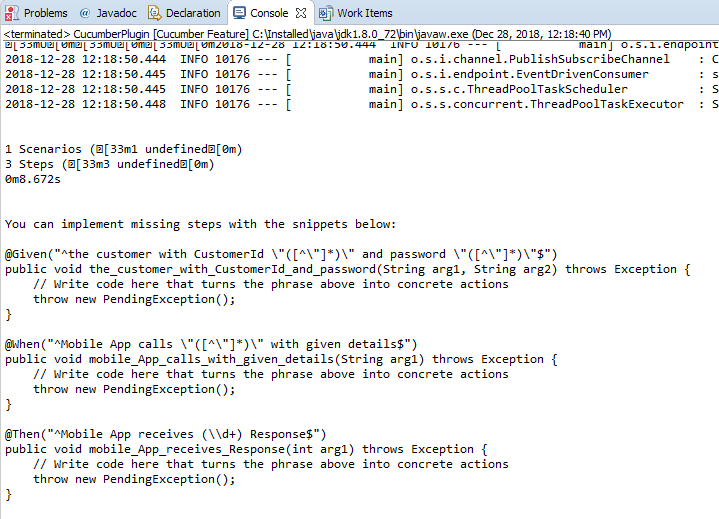
Image title
So if you see Cucumber Plugin has already developed the required methods for us in the console.So we need to put these methods in a Test class.So the final Test Class will be like below:
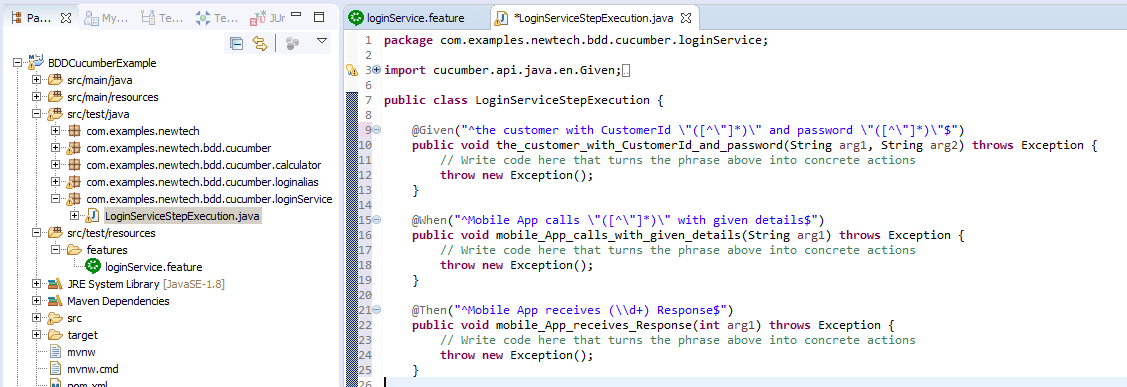
Image title
If you see the example StepExecution  class, you will notice we have given the exact definitions as per Given, When, & Then. The only thing we have changed is the Regex pattern to inject the string & int parameters into the methods. If there is any mismatch with the Definitions in .feature file and StepExecution  class, the test cases will not be passed.

Write Cucumber Runner Class

Now we need to write Cucumber Runner class so that Runner class can directly run the .feature files and StepExecution  class.Image title
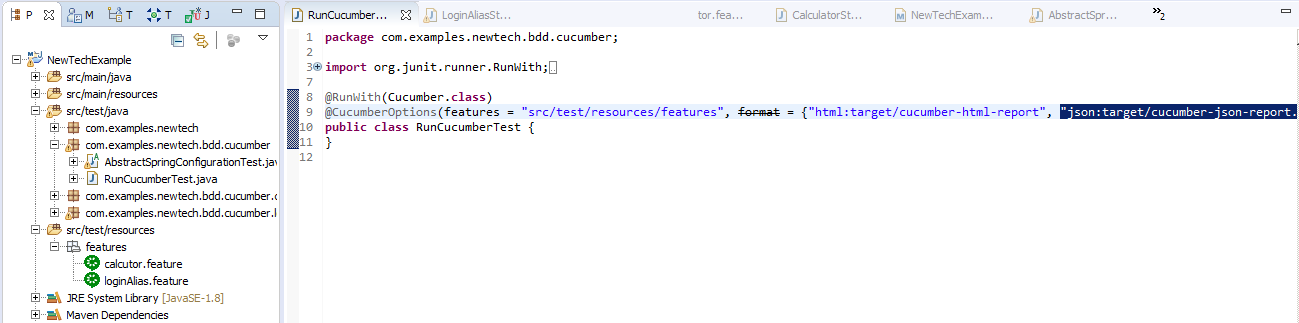
So the Runner class starts with @RunWith   which starts the Cucumber framework. It is same as @RunWith   in JUnit testing.
 @CucumberOptions  will help us to include the path where all the features are present and it will also give us an option to generate a report of the test cases.

Run Cucumber Runner Class

We are all done with our primary setup and now we are ready to rock. We need to run the Runner Class with JUnit test case. But as you know, if there is no implementation of the actual business logic, it will always fail like below.

Image title
The implementation is not there in the project yet and we are good to implement the business logic. So the next step would be implementing the business logic by the developers.

Pass Cucumber Test Case

Alternately, to pass the test case, we can create SoapUI Mock service or write a Mock Rest Endpoint within the project. The example might look like below:
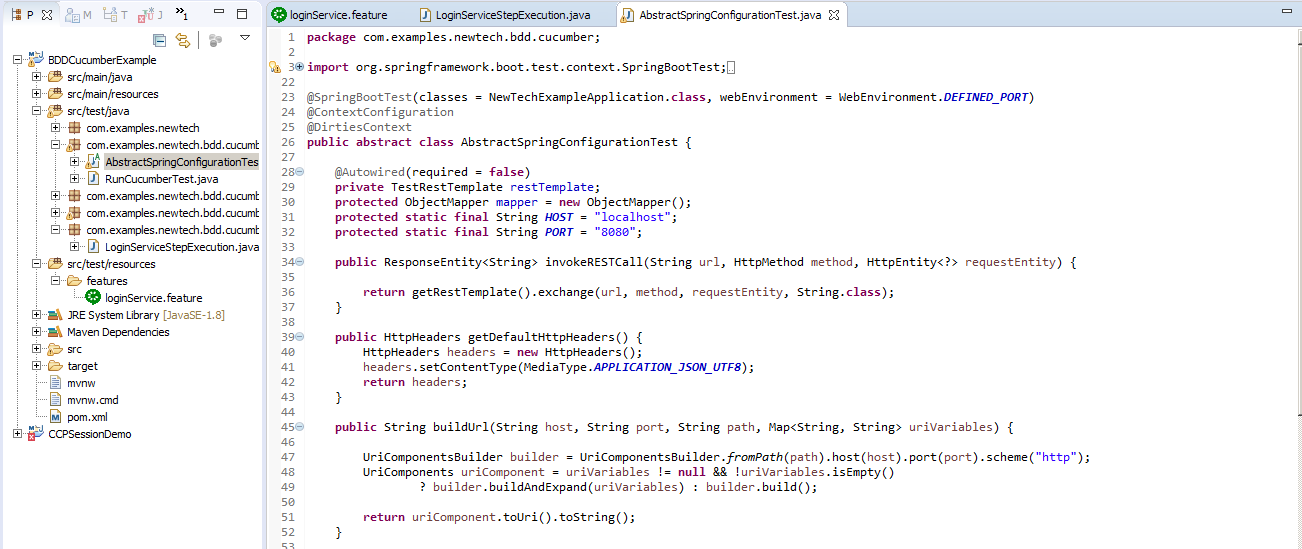
Image title
To make the test case pass, we need to extend this abstract class in our StepExecution class and we can now call an endpoint created by AbstractSpringConfigurationTest  class. So the modified StepExecution  class file looks like below:
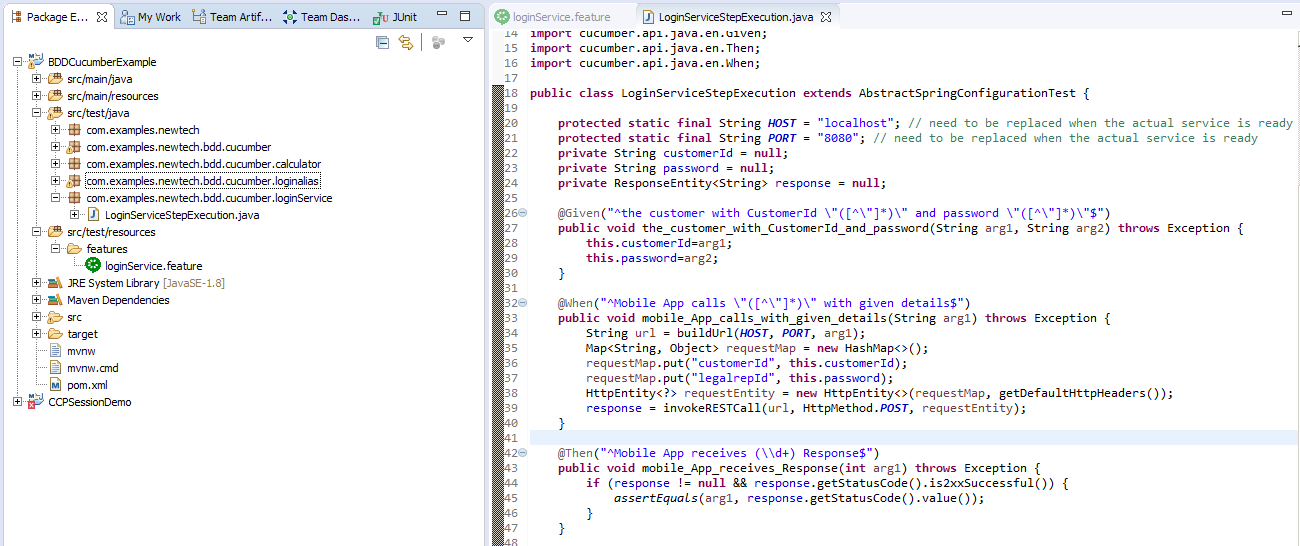
Image title
Now if we run the Runner Class with JUnit, it should pass and show as below:

Image title
Hopefully, with this explanation, we can understand the basics of BDD & Cucumber in a nutshell.

Tuesday, September 25, 2018

How to Be a Master in Software Development

Source: https://dzone.com/articles/how-to-be-a-master-in-software-development

Here are some of the subjects and general topics that you should familiarize yourself with to achieve mastery in software development.

A software developer’s job description goes well beyond mere computer programming. Many roles require that developers embrace taking part in the full lifecycle of software development and strive to improve the overall product by researching alternative ways and technologies to achieve the overall goal.
Being a master in software development is about knowing the full software development processes and having considerable expertise in the key parts of the process.
It requires an understanding of the nuances of design patterns and algorithms while following the best practices of software development, and an ability to be creative and think outside the box to offer logical solutions for programming problems.
Recently I wrote an article about the expert-specialist in the software development industry and the characteristics of this type of professional, which is important in order to become a master in developing software. 
Achieving mastery in the IT industry requires skills in server-side development, client-side development, DevOps, cloud computing, web design, distributed system, database, programming principles, code management, infrastructure management, scalability, security and much more.
While you won’t reasonably be able to master all of the above, you should try to understand most of them on a superficial level and deep-dive into several of these points.
Below is a list of essential points that experienced developers often lack but which a master engineer should be familiar with when applying for a lead position.

Programming Principles

Coding principles help to ensure good coding practice and concrete product development. Some of the most important Coding Principles to know are:
DRY (Don't Repeat Yourself), SOLID, Object Catallistic, TDD, and Defensive Programming.

Design Patterns 

Design patterning is a general, reusable solution to a commonly occurring problem. It is important to know some common DPs, and most importantly, to be able to identify the right pattern to a given problem. Some design patterns are a must have for a good developer, such as MVC, Singleton, DAO, Facade, Proxy, Adapter, Strategy and Abstract Factory.

Server-side Development

In complex systems, there are all kinds of logic that happen in the background and as a back-end developer, we face many challenges in processing business logic in an application. Any developer can write code, but the only experienced developer can write quality code with performance, scalability and reliability. The process of developing good software involves a lot of science and it is very important to know how to deal with:

Caching

you must know various mechanisms of caching data (file, database, memory, reverse proxy, HTTP...)

Memory Management

Java has automatic memory management with a nice Garbage Collector that cleans up unused objects and frees up some memory. However, a master Java programmer needs to have a good understanding of how memory actually works, as this gives the advantage of writing high-performance and optimized applications. It is essential to know about:
Stack, Heap, Strong Reference, Weak Reference, Soft Reference, Escape reference, how Strings are referenced, Garbage Collection Process, Metaspace and Garbage collector types.

Exception Handling

This is a very important and large topic, and I will write a dedicated post about it soon, but for now, some good practices when handling exceptions are:
  • Make your software reliable following the 'fail first' principle;
  • Do not catch exceptions you can not recover from;
  • Do not log your exception and then rethrow it;
  • Choose the right layer to handle the exceptions (e.g your DAO does not know the right decision for a database failure, but your service might know it);
  • Prefer unchecked exception if you cannot recover from it.

IO Operation

Being aware of the cost of IO operation and the possible unpredictable results.

Asynchronous Programming

Asynchronous programming in Java is achieved using Threads. It is a fundamental part of the Java platform. Using concurrency effectively is essential for building high-performance applications.
Words such as thread pools, data race, deadlocks, countdown latches, producer-consumer, atomicity, immutable objects, Futures, and Semaphore should not be something new for a master Java developer.

Batch Processing

Writing a batch job is very common and usually does important tasks. There are some basic rules to be aware of:
  • Every task should be divided by input, processor and output;
  • Always poll data input in batches;
  • Processor should be thread-safe;
  • Output should be atomic;
  • Store job results;
  • Consider using EIP patterns.

Distributed Computing 

In the modern world, distributed computing refers to the use of distributed systems to solve computational problems, however, distributed systems are different from conventional non-distributed systems and they add a lot of complexity to systems. Having experience in working in a distributed system will make a difference when a system starts growing and consuming more resources. Microservice software architecture is a good example of distributed computing and all the benefits and trade-offs of a distributed architecture. I am responsible for an open source project which provides a bootstrap to help people start a professional microservice architecture in a few minutes. I have written about the whole architecture here and also I recorded some videos showing how to use it here.
Definitely, microservices is something that is a required skill nowadays and it will require a lot of experience with distributed systems. It is important to have a good understanding of fault tolerance, availability vs. consistency, distributed transactions, distributed events, synchronous and asynchronous communication, distributed authentication, decentralized applications, applications of consensus, and more.

Database

Understand exactly what happens when data is sought from the database and all costs involved, connection handshake, data transmission, etc. It's also very important to have a clear understanding of atomic transactions and how to make sure your data is consistent.
Database is for managing data and this by itself is a tough task; don’t even think about adding business logic into your database. In large systems, database have already many challenges with security, scalability, capacity, and availability. Database management is a desired skill from a master software developer and at some point in time, you will be challenged to think about encryption, replication, sharding, Big Data and more. Knowing how a database works and how to optimize it along with the cost of each operation (e.g. reading is more memory intensive, writing more CPU) will help design efficiently the data management of your system.

DevOps 

A master developer needs to be able to promote the DevOps cultural philosophies and practices and advocate automation and monitoring at all steps in order to increase the organization’s ability to deliver applications and services at high quality and velocity. Deploying code or provisioning infrastructure must be automated, flexible, and monitored. A great developer should know well the development cycle from integration, testing, releasing to deployment and infrastructure management. In order to achieve it, you will need to know about cloud computing, Linux, networking, containers, artifacts management, and more.

Code Management

Given the importance of code, it is only natural that only master developer is able to care of the code lifecycle and promoting engineering best practice. For that, he will need to know well a source code management system and have clear understanding of branching strategy, versioning, distributed revision control system, code quality guarantee tools, code communication, dependency management, configuration management, and much more.

Security 

Web security is very hard to achieve and depends on a lot of external parameters; however, we need to follow the best practices and general guidelines for building secure web applications. A master engineer needs to have a good understanding of information security, not only how to avoid building insecure and vulnerable systems, but also how to protect customers privacy.I have written about privacy by design here.
A great developer needs to be able to create a guideline to handle beyond the top 10 web application security risks. In the web application, we have many more security threats that need engineering action, including:
  • Uploaded file check;
  • Brute force protection;
  • Session expiration handler;
  • Session origin validation;
  • Secure communication over the internet;
  • Secure Cookie access;
  • Credentials handling.

Front-end Development 

A front-end development is a very important part of a software and you will not be a master software engineer if you don't know how programming and user-experience meet. So far I have avoided naming technologies, but in the front-end world, Javascript and CSS are a must-have for a software engineer. It's not easy to achieve mastery in both but is very important to understand how they work and how both, along with HTML connect, enable us to provide a great user-experience.
To lead a front-end team, you will need to know more than how to build a beautiful layout, front-end development goes beyond, and you will need to know
  • What is possible to build using browsers as engine;
  • How to develop responsive websites; how to improve website performance;
  • How to develop a single page application;
  • How to build a modern and efficient development environment;
  • Be familiar with the new HTML5 APIs.
Web development is huge area and in order to master in this matter, the developer will need to be self-motivated, proactive in learning new technologies and wear many hats during your career. Keep challenging yourself and you will get better at problem-solving, which is the essence of programming. Knowledge is important, critical in some cases, but in a field that changes so quickly, how you go about get that knowledge is more important than what you know at any given time.

Monday, January 14, 2013

Simply Writing Tests Is Not Test Driven Development

Source: http://spin.atomicobject.com/2012/12/06/writing-tests-is-not-tdd/

Simply Writing Tests Is Not Test Driven Development


There is a common misunderstanding in the software world — simply writing tests is test driven development. Test driven development (TDD) is about ensuring that your software is functioning, as well as ensuring that the software’s internals are well designed, reusable, and decoupled.

What is TDD?

Uncle Bob’s 3 basic rules of TDD are:
  • You are not allowed to write any production code unless it is to make a failing unit test pass.
  • You are not allowed to write any more of a unit test than is sufficient to fail; and compilation failures are failures.
  • You are not allowed to write any more production code than is sufficient to pass the one failing unit test.
To summarize Uncle Bob’s rules:
  • Only write code that is tested.
  • Start your tests small, then work your way up.
  • Only write enough production code to make a test pass.

Basics of TDD

The basic process of TDD has 3 steps: Red, Green, and Refactor.

Red

The red step consists of writing a failing test, only one failing test. If you keep getting ahead of yourself and writing multiple tests, borrow an idea from Getting Things Done and get the ideas out of your head so they don’t get in the way of other thoughts. There are a number of different mechanisms you can use: create a to-do list on paper, make an index card, create a series of TODO comments in your files, etc. I find the physical action of crossing off an item on paper or writing a check mark and folding an index card in half gives me more of a sense of accomplishment.
Your first test for a new object should be simple. TDD focuses on emergent design, the opposite of big design up front. Let the design fall out of your code. The purpose of the first test is not about functionality. It’s about flushing out the usage of what you are about to create.
Start with the inputs: “What do I have to feed into this function?” Next, think about the outputs: “What will this function be spitting out?” Then write an assertion, run your test suite, and verify that the test you just wrote is red.
All the other test cases in the red stage should be about capturing functionality. Don’t just test the happy path; think about the craziest thing you could do with the function or object. What happens when I pass in a null parameter? What happens when I pass in a negative value? How about when I pass in a string when it’s expecting an integer?

Green

The green step consist of making the failing test pass as quickly as possible. If more than one test is failing, start with making the test you just wrote pass, and then continue working the reds to greens one at a time. Don’t worry about how the code looks or how efficient it is. Your concern should be with making the test pass so you can move on to ensuring the next bit of functionality is under test.

Refactor

The next step is refactoring, restructuring, and organizing your code. The refactoring step can occur at anytime — after 1 red/green cycle, after 4 red/green cycles, etc. Since you have a number of passing green tests, you can refactor with ease and comfort, knowing that your tests will fail if you regress and lose functionality.
Refactoring shouldn’t only be about restructuring your code and making it more easily readable. Tests need refactoring love and attention too, but don’t refactor code and tests at the same time.

Benefits of TDD

Working Code

One of the primary benefits of TDD is that you have functioning and working code at all times. You spend time narrowing in on pieces of functionality and ensuring that they work as intended.

Fearless Changes

TDD allows for fearless changes. I worked on a number of software projects prior to being enlightened by the magic of TDD. A common thread of thought, looking back, is that I was always deathly afraid of making changes. I spent more time using the application than I did writing code, just to make sure I was maintaining functionality and not causing regressions in specific features. With TDD, that fear is removed because functionality is under test, and you’re able to get near-instantaneous feedback about the system or parts of it. The ability to make fearless changes via refactoring causes the internal quality of your software to improve and eventually bleeds through to being external quality.

Living Documentation

TDD also provides you with a living documentation of the code. If you are anything like me, then when exploring a new library, you want to skip all the fluffy documentation and cut to the chase, looking at examples on how to use it. It is important that we keep this in mind when writing and refactoring our tests — it’s our responsibility to make the test readable and easily understandable. Unlike comments or extremely long manuals, tests are executable and will tell you if they are lying.

Designing Through Code

I am always troubled that one of the D’s in TDD doesn’t stand for design. As I touched on briefly before, the practice of TDD is not entirely about writing tests, ensuring coverage and working software. TDD flips software development on its head. It forces you to think about the problem from the outside in, instead of from the inside out.
Writing tests first forces you to not be worried or concerned about implementation, the primary worry and concern is with using your object or function. Since we are spending a fair amount of time directly interacting with the objects and functions we are writing, architecture and design come to the forefront.

When Not to TDD

What if you’re using a new library or framework and you don’t know how to use it? How can you write tests first if you don’t know how to begin? The answer is you can’t. Create a new project, and use the new library away from your production code base. This new project is known as a spike. Since this isn’t production code, you aren’t violating Rule #1 of Uncle’s Bob’s 3 basic rules. Code until you feel comfortable with the library. When you know how your library works, ignore the spike, go back to your production code and start writing tests.
However, just because you can’t TDD, do not completely throw away the discipline of writing tests. Your tests will serve as a reference for you and (if your spike is in source control) a reference for those who come behind you. Using these tests, you can quickly recall what you have learned, and you will hopefully be able to look back and see a progression in your technique.