Translate

Showing posts with label Automation. Show all posts

Monday, February 11, 2019

BDD – An Introduction and Usage Guide

Source: https://dzone.com/articles/tddbdd-an-introduction-amp-usage-guide

Take a look at how you can use Cucumber to ensure your BDD methods are up to par.


When I was asked to implement TDD/BDD in our work, I searched a lot for a single-page document/site but was not able to find one. Though there are plenty of very good resources available on this topic, I have decided to create a single article to show both of these 2 approaches hands-on.

Overview

In Agile development, organizations want to be market ready for new products, features, and functionalities within a very small period of time. But traditional testing methodologies cannot ensure this. To keep up the pace with this rapid development in an Agile environment, a few new design practices for Software Testing were born. We can name a few like ATDD, TDD, BDD, or Integration Testing, but we will limit our discussion to TDD & BDD which are the most used practice nowadays.

BDD (Behavior-Driven Development)

Chronologically, BDD practice comes after TDD came in action. Basically, BDD is an evolution over TDD. The purpose of this design is to make a bridge between business analyst and development teams through a common language which is purely based on business requirements and Agile practice.
BDD follows a similar process as TDD but it follows an Outside-In approach as opposed to TDD. Here, test cases are written at the start of the development phase. A test case has to be run to fail, the developer needs to write the business logic code, then run the test cases again. The same is true for TDD. But the difference here is the common language used for describing the functionality. Let's explain this in an Agile way.
When a requirement comes to technology teams for implementation, some business analyst/Product Owner creates a feature in a collaborative tool like Jira or RTC. Now every feature will have few scenarios to be implemented which are known as the acceptance criteria. The BDD approach takes the acceptance criteria to be implemented as test cases. So, while a new feature is being implemented, BDD makes sure all the scenarios are converted to proper test cases. Thus, the greatest advantages of the BDD approach is to fill the gaps between non-technical teams and development teams.     
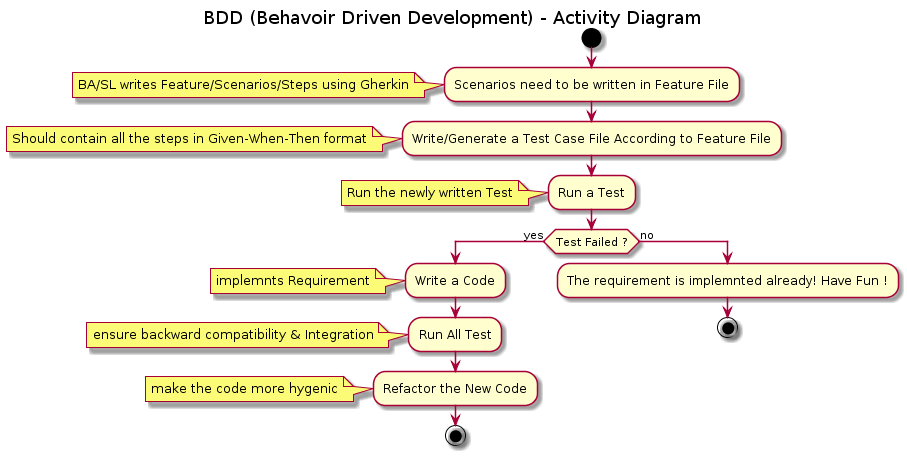
Image title

BDD Framework Overview

There are a couple of available frameworks in the open source community for BDD practice, like JBehave, RSpec, GivWenZen, and Cucumber, to name a few. But we will take Cucumber as it’s the most common framework for Spring Boot and microservices architectures.

Cucumber

Cucumber is an open source library available for most language platforms, but we will concentrate our discussion with only Java.
Before deep dive into Cucumber with examples, we need to understand few basics of it. Basically, Cucumber reads executable specifications written in plain text and validates that the software does what those specifications say. In order for Cucumber to understand the scenarios, they must follow some basic syntax rules, called Gherkin.

Gherkin

Gherkin uses a set of special keywords to give structure and meaning to executable specifications. You can think this as representations of acceptance criteria. Gherkin can be supported by many languages but we will use English as a reference language.
The lines in each Gherkin file contains a keyword. A few of the most used keywords are below:
  • Feature
  • Scenario
  • Given, When, Then, And, But (known as Steps)
  • Examples
There are other few keywords which we will learn on the job itself. A very basic example of Gherkin Structure is below:Image title

Feature: The purpose of the Feature keyword is to provide a high-level description of a software feature. It should be the same description as the epic or feature in Jira or RTC.
Scenario: The scenario gives you the different expected results of that particular features. It can be multiple success/failure cases as defined in Swagger.
Steps: Each step starts with Given, When, Then, And, or But. Cucumber executes each step in a scenario one at a time, in the sequence you’ve written them in. When Cucumber tries to execute a step, it looks for a matching step definition to execute.
  • Given: Input
  • When: Method or Function
  • Then: Expected Result
  • And: Multiple Result
  • But: If – Else Result

Cucumber Configuration

Enough with the terminology and technical details. Let's have some fun with hands-on coding. First, you need a favorite IDE (Eclipse, STS or IntelliJ). We will create a sample Spring Boot project from start.spring.io, or use the plugin and add a Spring Test Dependency along with Starter boot parent.

POM Configuration

Now let's configure the POM with the required Cucumber dependency. I used version as 2.3.1 but you can use the latest version as well.
<properties>
<java.version>1.8</java.version>
<cucumber.version>2.3.1</cucumber.version>
</properties>
<dependencies>
<dependency>
<groupId>org.springframework.boot</groupId>
<artifactId>spring-boot-starter-integration</artifactId>
</dependency>
<dependency>
<groupId>org.springframework.boot</groupId>
<artifactId>spring-boot-starter-web</artifactId>
</dependency>
<dependency>
<groupId>org.springframework.boot</groupId>
<artifactId>spring-boot-starter-test</artifactId>
<scope>test</scope>
</dependency>
<dependency>
<groupId>io.cucumber</groupId>
<artifactId>cucumber-java</artifactId>
<version>${cucumber.version}</version>
<scope>test</scope>
</dependency>
<dependency>
<groupId>io.cucumber</groupId>
<artifactId>cucumber-junit</artifactId>
<version>${cucumber.version}</version>
<scope>test</scope>
</dependency>
<dependency>
<groupId>io.cucumber</groupId>
<artifactId>cucumber-spring</artifactId>
<version>${cucumber.version}</version>
<scope>test</scope>
</dependency>
</dependencies>
Once you configure your POM, let's run a Maven build to ensure the dependency got injected in your local system.

Create Feature File

Now it's time to write the Gherkin in a Cucumber readable file. Basically, the Cucumber framework can read a Gherkin file but that needs to be named as a .feature file. So we have created below file in Eclipse workspace. We named as loginAlias.feature.

Image title

Write/Generate Step Definitions Class

Next step would be to write the test cases which execute the steps defined in the .feature file.Basically, you can write by your own or use a Plugin to generate the StepDefs Java files.
You can download the plugin from Eclipse MarketPlace
Once you install the plugin, you can right click on the feature file and generate the StepDefs file using the Plugin (Run as Feature). In the console, you can find the required methods, which you can put in StepExecution.class.
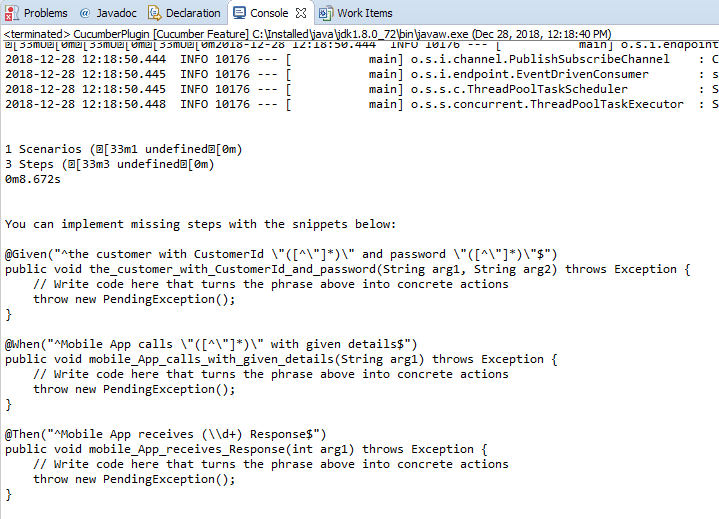
Image title
So if you see Cucumber Plugin has already developed the required methods for us in the console.So we need to put these methods in a Test class.So the final Test Class will be like below:
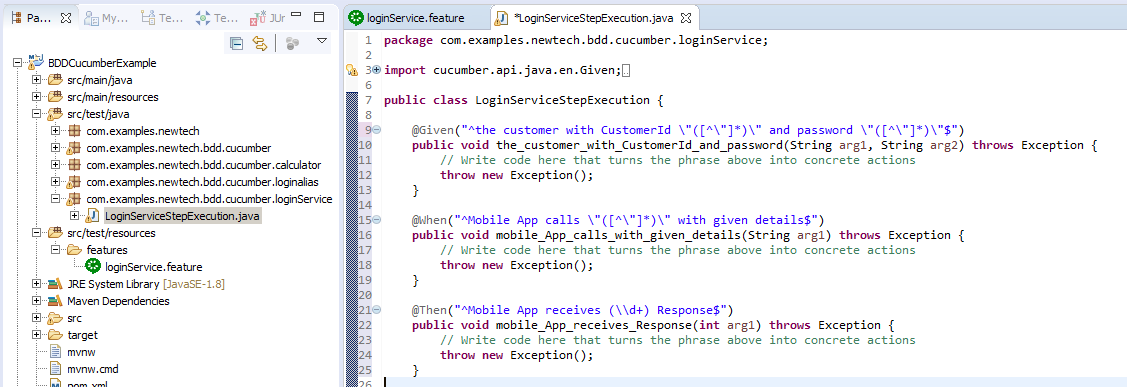
Image title
If you see the example StepExecution  class, you will notice we have given the exact definitions as per Given, When, & Then. The only thing we have changed is the Regex pattern to inject the string & int parameters into the methods. If there is any mismatch with the Definitions in .feature file and StepExecution  class, the test cases will not be passed.

Write Cucumber Runner Class

Now we need to write Cucumber Runner class so that Runner class can directly run the .feature files and StepExecution  class.Image title
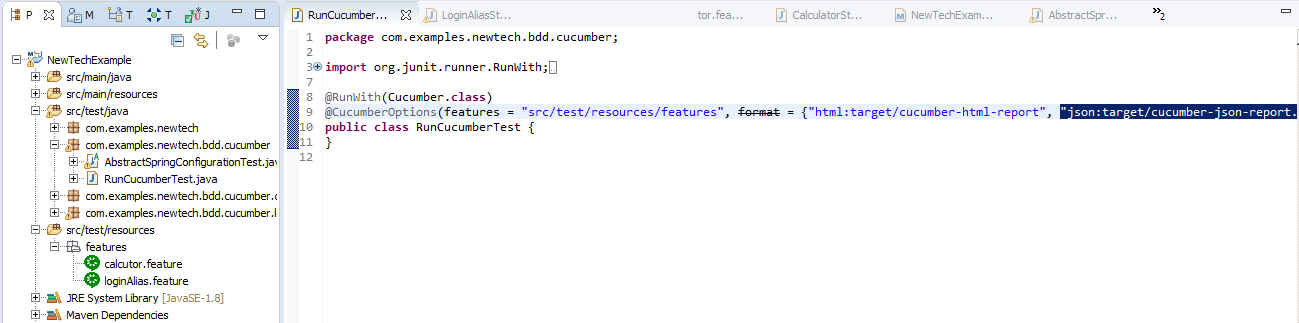
So the Runner class starts with @RunWith   which starts the Cucumber framework. It is same as @RunWith   in JUnit testing.
 @CucumberOptions  will help us to include the path where all the features are present and it will also give us an option to generate a report of the test cases.

Run Cucumber Runner Class

We are all done with our primary setup and now we are ready to rock. We need to run the Runner Class with JUnit test case. But as you know, if there is no implementation of the actual business logic, it will always fail like below.

Image title
The implementation is not there in the project yet and we are good to implement the business logic. So the next step would be implementing the business logic by the developers.

Pass Cucumber Test Case

Alternately, to pass the test case, we can create SoapUI Mock service or write a Mock Rest Endpoint within the project. The example might look like below:
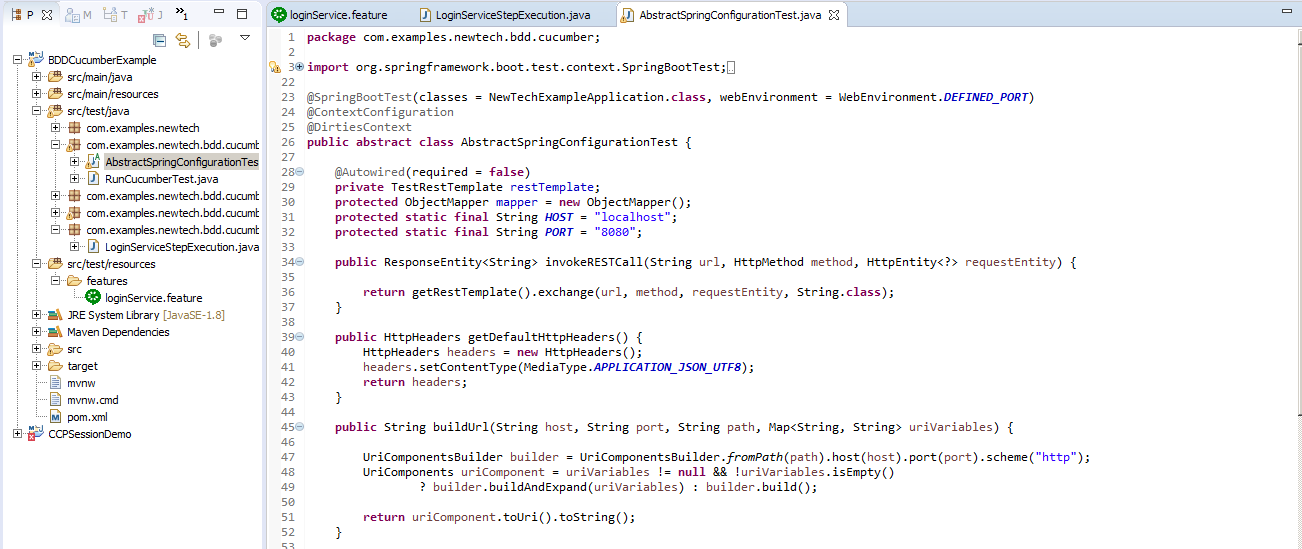
Image title
To make the test case pass, we need to extend this abstract class in our StepExecution class and we can now call an endpoint created by AbstractSpringConfigurationTest  class. So the modified StepExecution  class file looks like below:
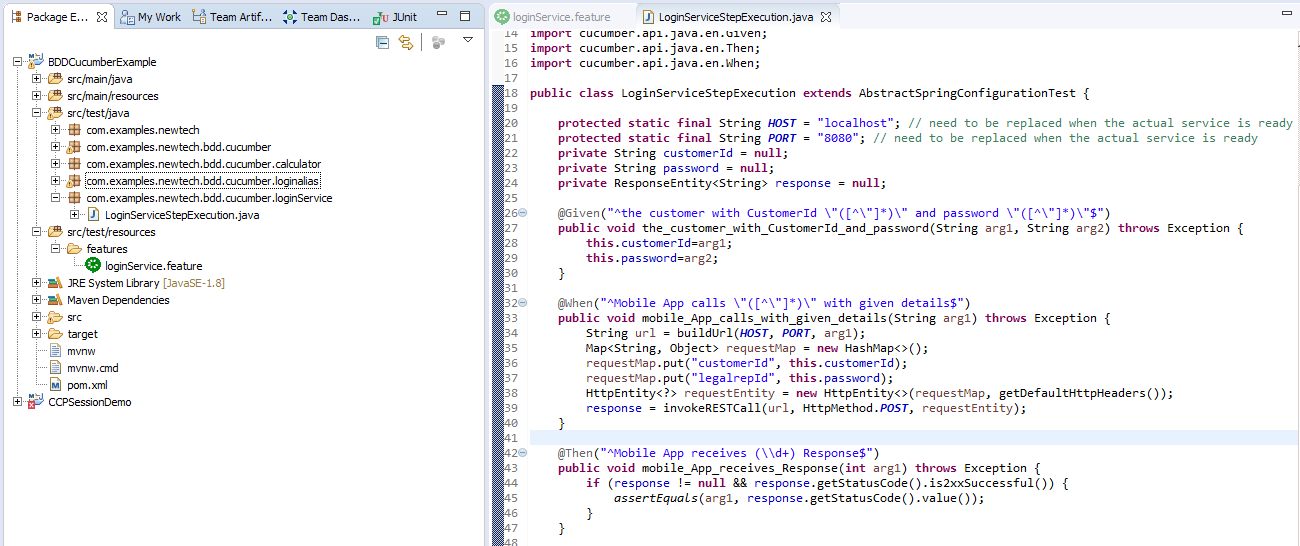
Image title
Now if we run the Runner Class with JUnit, it should pass and show as below:

Image title
Hopefully, with this explanation, we can understand the basics of BDD & Cucumber in a nutshell.

Sunday, December 23, 2018

Automated Regression Testing


Automated Regression Testing Ascertains Code Changes and Functionality Issues

by Charles Taylor https://dzone.com/articles/automated-regression-testing-ascertains-code-chang

Learn why you should automate your regression testing, plus tools and time saving tips.

Automated regression testing ascertains code changes and functionality issues. In other words, it is a quality measurement check to discover if new code complies with the old code so that the remaining unmodified code stays unaffected. Automation regression testing also allows for finding any bugs that may have occurred due to changes in the code and if the testing is not done, the product could have a critical issue occur during a live event which can lead to negative marketing impact.

There are various types of automated regression tests and they include:

  1. Unit Regression – done during the unit testing phase when a code is tested in isolation.
  2. Partial Regression – done to verify the code works fine even when the code is changed performed while the unit is integrated with the unchanged or already existing code.
  3. Complete Regression – done when a change in code is in numerous modules and/or if the change impact in any module is uncertain.

It is understood that automated regression testing is hard because for every action performed there is a reaction. A few result in successful tests but there may be another two-hundred that will lead to failure. Unfortunately, there is no one size fits all test strategy for automated regression and shortcuts that are used, have not had consistent positive results. The good news is there are some comprehensive specs, rules, and examples that countless software engineers have diligently put together for our knowledge base and application protocol. (Baril, Gounares, & Krajec, 2014)

The Reason We Have Automated Regression Testing


Automated regression testing’s intent is to speed things up, so we can increase quality and velocity simultaneously which results in obtaining the prize of all promotional tools – being the first to market. It doesn’t matter if you are releasing a new software suite, software feature or even if you wish to make sure a particular software feature is current and working properly, there are steps to take, rules to follow and regression automation tests to conduct. Common practice is to utilize a suite of four regression automation tests which perform in an exemplary manner. They are:

  1. Retest all and repeat frequently – the entire test case in the suite are re-executed to ensure there are no bugs from a change in the code. This regression test is expensive due to its expansive nature and requires more time and resources than any of the other types of automated regression testing methods.
  2. Selection testing is worth using for maintenance – test cases are selected from suites to be re-executed. The test cases are selected from code changes in the modules and have two categories – reusable and obsolete. The reusable test cases can be used in future regression cycles whereas the obsolete ones are not used in future regression cycles.
  3. Prioritization to create stability – priorities are created, and the test cases depend on the listed and needed priorities to be for product impact and functionality.
  4. Simple – a combination of regression test selection and test case prioritization. Rather than selecting the entire test suite, only test cases which are re-executed and are listed as a priority are designated.

It should be noted automated regression testing not only enables checks into various changes but can also release and prompt testers to conduct manual assessments in the more uncommon cases respective to their unique production environment.

Stakeholders are usually willing to accept automation regression testing as being a part of the final analysis of ‘completion’ for user stories being worked on and evaluated. User stories are only closed when the corresponding automated tests were run effectively and efficiently and had successful outcomes. When the feature is successfully released into production, the regression suite becomes part of the tests. In layman’s terms that means there is a stable version of tests which now exist as part of the regression suite-built layer by layer and are available whenever development of a new feature is added. (Briand, Labiche, & Soccar, 2002)

However, there is a more difficult automated regression test to perform which occurs when a feature was released into production without having any automated tests performed. The challenge then becomes finding a regression suite to put into place since you can only do that incrementally, layer by layer so prioritization is mandatory to ascertain what must be tested.

Automated Regression Testing Tools and Time Savers


There are various tools that can be used in automated regression testing which combine testing with functionality in a single platform and a couple of popular ones include Selenium and vTest. However, there is a sidebar that needs to be considered and understood when using automated regression testing tools. The implementation of the tests are faster than manual tests but be cognizant that everything else will take significant time, so preparation is the key. What does that mean? It means that writing the tests and setting up the suite needs must be prioritized, listed and understood. To help save some inefficient use of your time, we have listed some automated regression testing time savers. (Raulamo-Jurvanen, 2017)

  • Try to write individual and independent tests because you will ultimately regret it if you don’t. By not writing individual and independents tests, if an issue arises, you will find because you did not write an independent test, your solutions are problematic and must work around test orders and the storing of state and data between test runs.
  • Separate acceptance and end-to-end tests because they do entirely two different things and need to run separately to get proportions correct. Acceptance tests target and test one thing efficiently and effectively. An end to end test is implemented to cover the user’s journey through an app and then test the app the same way a user access it. The end to end tests do take more time and are considered fragile because they contain so many incremental steps.
  • If you want your test to perform brilliantly, decipher why you are doing automated testing and once you ascertain need, determine what measurements will be needed. Your end goal should be to have as few automated tests as possible and only use them for valid and objective business reasons because automated tests are time-intensive and costly.
  • Never forget that intention and implementation are two different things. When writing scenarios, it is logical to input how best to implement the set-up, but that thinking is faulty and will not help longevity within your specifications or enhance business readability. Intentional features and scenarios provide outcomes that are clear and easy to understand and if you really want to provide exemplary solutions you can even build in the ability to change your test if needed without changing your specifications.
  • Automated regression testing is not a one shot and you’re done a deal because if you don’t run them on a consistent basis, they will become almost useless when someone changes the code. The test should be in the same source control repository as the app, so they will not be forgotten about or ignored.
  • Automated tests should never be run on several browsers because almost every browser performs differently with slight variations which invalidate true results. In essence, you are probably wasting your time. Try to find the browser most of your customers will be using. Google Chrome is usually a good place to start.
  • There are nuanced differences in manual and automated testing. This sounds like a no-brainer but it’s not. Automated testing is the testing of choice for functionality, but it does not do well in testing stories or exploring your system. Automated, artificial regression testing no matter how brilliant, logical or error-free, rarely understands weird quirks or cultural definition variances. But humans can find those unique perspectives and manually test them which is more cost efficient and allows for fine-tuning for human users’ needs.
  • Try to run your automated tests as they incrementally grow and develop to speed up your run times. It takes almost no time to create an agent to run tests and collate the results on a consistent loop integrated with the testing server.
  • Use, use and use your application development team because each member should be accountable for quality. The most effective and efficient automated tests are developed with the application development team because they integrate what is needed with what can be tested with the results being successfully magnified.
  • Try to find an opportunity to extract the most value for the least amount of time and energy. If you have to keep running automated end to end testing after deployment of the product, is it a good use of a company’s outlay? Always seek value in every level of testing. Always.

Automation regression testing is one of the most important aspects in helping deliver a quality product because it makes sure that any change in the code whether it’s small or large does not affect the existing or old functionality. You can even use automaton to create master data and setup configurations for manual testers which ultimately allows you to facilitate the needs of the various operations within your company or organization. There will be new tests in automation with techniques discovered and challenges to solve. The journey to achieving optimum levels of automation in regression testing must start by taking the first step.