Translate

Showing posts with label load balancer. Show all posts

Tuesday, January 8, 2019

How to Become an AWS Expert


by Michael Wittig Dec. 31, 2018

With more and more developers and companies making use of AWS, it couldn't hurt to become an expert.

If you are just starting to use AWS today, you might think it's going to be hard to catch up. How can you become an AWS expert? How can you know everything about AWS? I asked myself the same questions some time ago. Let me share my answer on how to become an AWS expert.

My Story


I have used AWS for more than five years. Working with my clients of all sizes and industries challenges my AWS knowledge every day. I also maintain several AWS open-source projects that I try to keep up-to-date with the ever-improving AWS platform.

Let me show you my tips on staying up-to-date with AWS and adapting to new things. Here are three examples of the most exciting and surprising things I learned about AWS this year:

  • Network Load Balancers
  • Amazon Linux 2
  • Amazon Cloud Directory

Network Load Balancers


When I started using AWS, there was one option to load balance HTTP and raw TCP traffic — what is now called a Classic Load Balancer. Since then, the portfolio of load balancers has expanded. You can now also choose the Application Load Balancer to distribute HTTP(S) traffic (including HTTP2 and WebSockets) or the Network Load Balancer, which operates on layer 4 to load balance TCP traffic.

When reading the Network Load Balancer announcement, I found myself interested in this shiny new thing. And that's the first important part of learning something new: If you are interested in the topic, it's much easier to learn.

Tip #1: Pick the topics that are interesting


When I'm interested in a topic, I dive into the documentation and read it from top to bottom. It can take a few hours to finish reading before you can start using the new service or feature. However, you then know about all the concepts, best practices, and pitfalls, which saves you time in the long run.

Tip #2: Reading the documentation is a good investment


Can I remember everything that I read? No. For example, there is one documented limitation to keep in mind when using the Network Load Balancer: Internal load balancers do not support hair-pinning or loopback. I read about it and still ran into it. Sometimes, I have to learn the hard way as well.

Amazon Linux 2


Amazon Linux 2 is the successor of Amazon Linux. Both distributions come with a superb AWS integration, a secure default configuration, and regular security updates. You can open AWS Support tickets if you run into any problems.

So, what's new with Amazon Linux 2? You get long-term support for five years and you can now run a copy of Amazon Linux 2 on your local machine or on premises. The most significant changes are the replacement of SysVinit with systemd and a new way to install additional software, also known as the extras library.

The systemd init system was all new to me. I decided that it was time to change that and I remembered a session from the local AWS User Group in my city about systemd that I had missed. Luckily, I knew the speaker well. I asked Thorsten a few questions to get an idea about the topics I should learn about to understand how systemd works.

There is always someone who knows what you want to learn. You have to find that person. I encourage you to connect with your local AWS community.

Tip #3: It's easier to learn if you have a network of people to ask questions of and get inspired by


Amazon Cloud Directory


One of my projects this year was all about hierarchical data. I was looking for a way to store this kind of data in AWS, and I discovered Amazon Cloud Directory. Cloud Directory was all new to me and seemed difficult to learn about. I read all of the documentation. Still, it was painful and I wanted to give up a few times. That's normal. That's why I reward myself from time to time (for example, read one more hour of docs and then go for a walk).

Tip #4: Learning a new thing is hard at first. Keep going.


Cloud Directory is a fully managed, hierarchical data store on AWS. Hierarchical data is connected using parent-child relationships. Let me give you an example. Imagine a chat system with teams and channels. The following figure shows a Cloud Directory data model for the imaginary chat system.


When you have a good understanding of a topic, it's time to master it by using it. You also learn so much while explaining a concept to someone else. That's why I wrote a blog post, A neglected serverless data store: Cloud Directory.

Tip #5: Apply your knowledge. Share your knowledge. Teach others.


Summary


Becoming an AWS expert is a journey without a final destination. There is always more to learn. AWS is a huge platform with 100+ services and countless capabilities. The offerings are constantly changing.

I want to encourage you to become an AWS expert. Why not start with one of the new services released at re:Invent this year? Pick the one that is most interesting for you. Read the documentation. Ask questions of others. Be inspired by others. Apply your knowledge. Share with a blog post or a talk to your local AWS user group. Isn't this what an expert does?

Source: https://dzone.com/articles/how-to-become-an-aws-expert

Sunday, September 16, 2012

Overview of Single vs. Multi-Server Architecture


The Components

There are a number of competing components used in server setup, and for this discussion which component specifically used is not especially interesting. To be more specific
  • When I refer to Nginx, it could actually be any lightweight http server. That could mean Lighttpd or even a stripped down Apache instance.
  • When I refer to Apache and mod_wsgi, that could be Apache and mod_python, or even Nginx running FCGI. It's any server which is serving Django projects.
  • Postgres is my relational database of choice, but you could substitute it with MySQL or SQLite. Hell, you could even be using CouchDB for the extent of this discussion.
  • For caching I mention memcached, which doesn't have many direct competitors, but to the extent that they exist, they could be used interchangeably.

The Single-Server Approach

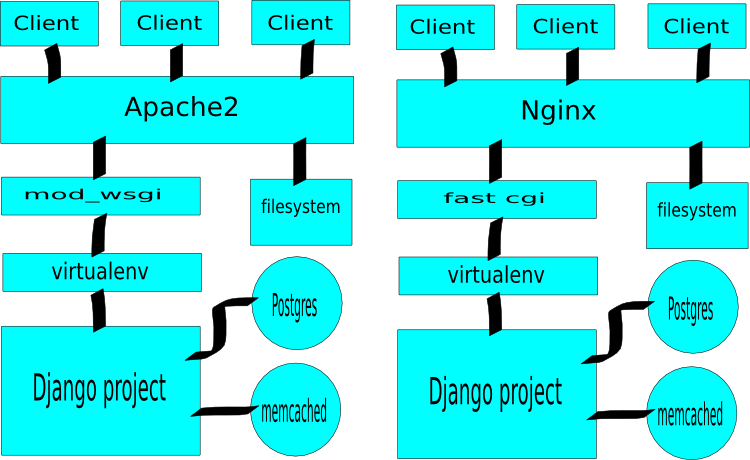
The simplest approach to serving a Django project is to configure one server to serve both dynamic (Django rendered pages) and static content (images, CSS, JavaScript, etc).
Single server layout for serving Django projects.
The biggest advantage of this single-server approach is in its simplicity. Especially Apache--but other systems as well--is very quick and painless to setup for a configuration like above (I find Nginx and fcgi a bit less straight forward, but certainly doable as well).
Another advantage is that you only need to run one server at a time, and servers can hog memory and cpu, especially on low powered solutions like a small VPS.
That said, the single-server approach is a bit unwieldy when it comes to scaling your site for higher loads. As with other approaches, you can begin scaling the single-server setup vertically by purchasing a more powerful VPS or server, but trouble starts to sneak in when it is no longer cost-effective to increase capacity by upgrading your machine.
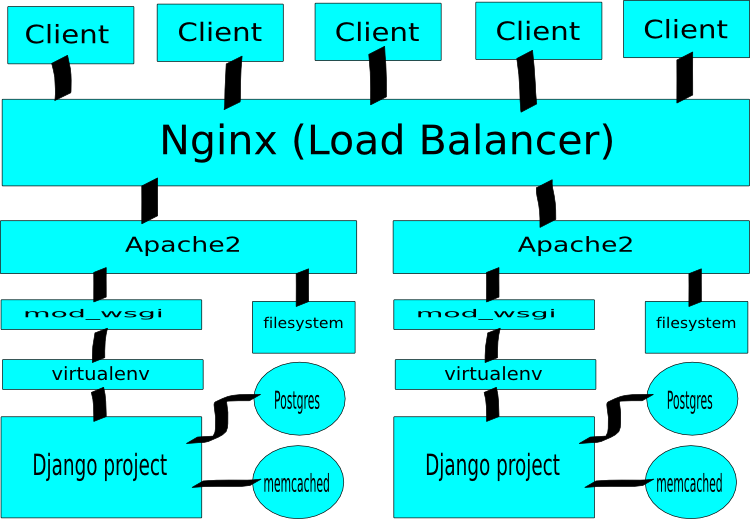
Upon reaching that situation, your first move will typically be to move your database to a second machine, which is easily accomplished. However, when you need to add more capacity for serving dynamic or static content, the setup is a bit inflexible. Your first and only option is to add additional machines behind a load-balancer.
Load balancing and scaling for single http server approach.
Although in reality you'd likely have Postgres on a separate machine.
In review, the single-server setup may be the most efficient option for low resource environments, is relatively simple to configure1, but must serve static and dynamic content with the same configuration, and thus may open itself up for inefficiencies as demands grow (we'll discuss this more below).

The Multi-Server Approach

Anyone who has read a tutorial describing mod_python usage has probably read the term fat threads, which is the word du jour for describing Apache worker threads whenmod_python is enabled. This is because each mod_python worker thread needs a Python interpreter associated with it, causing each worker thread to consume approximately 20 megs of ram.
There are good reasons for that, and mod_python is extremely fast at serving dynamic requests, so the cost is certainly justifiable. However, why have a heavy thread serve a static file when a much lighter one is sufficient? Further, how do we prevent our relatively low quantity of heavy threads from being monopolized by slow connections (and as a result able to serve fewer concurrent users)?
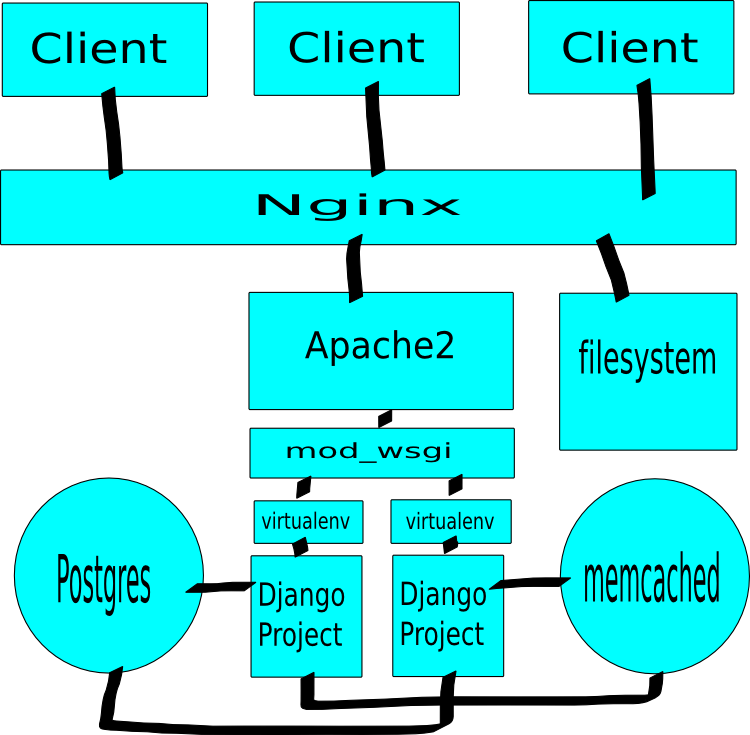
The standard answer to that question is to have a lightweight server that is the first point of content for users, serves static media, and proxies requests for dynamic media to heavier threads on a second server.
Image of nginx, apache2, mod_wsgi, postgres, virtual env, memcached deployment.
Essentially the argument being made be the multi-server setup is that specialization leads to efficiency. By allowing one server to focus only on serving dynamic media we can tweak its settings to maximize performance for that task. By allowing a second server to focus on serving static media, we can optimize it as well.
Beyond the specialization leads to optimization argument, the multi-server approach has another benefit over the single-server approach: ease of efficient scaling. Because we have separated the concerns from one another, it makes it very easy to scale efficiently by adding capacity exactly where it is needed.
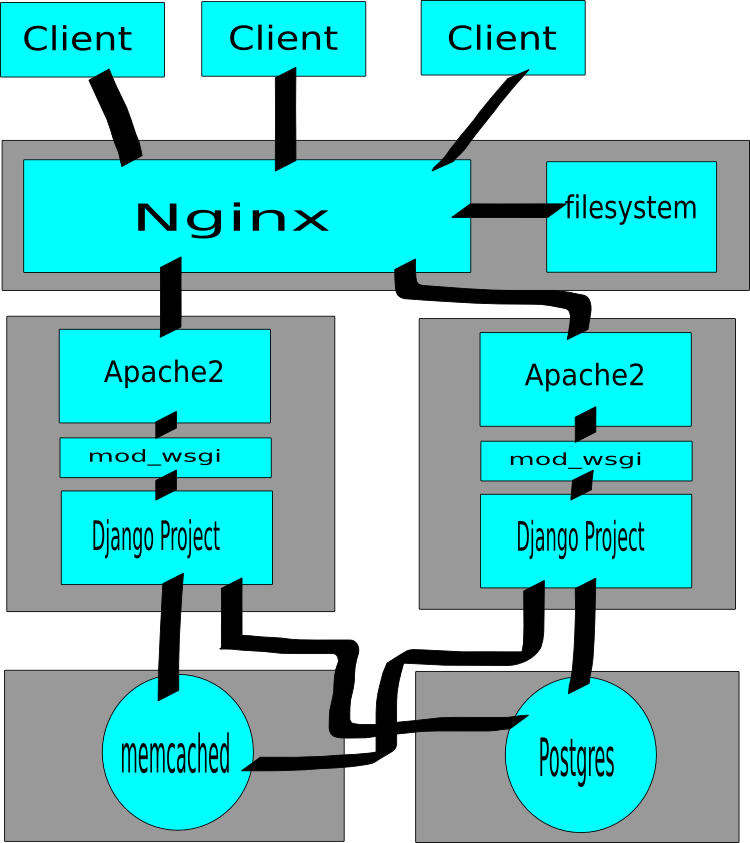
With only minimal configuration file changes you could switch the simple one machine model to a many machine model. This is especially simple if the narrowest point in your pipe is serving dynamic content.
Image of splitting a one machine setup to multiple machines.
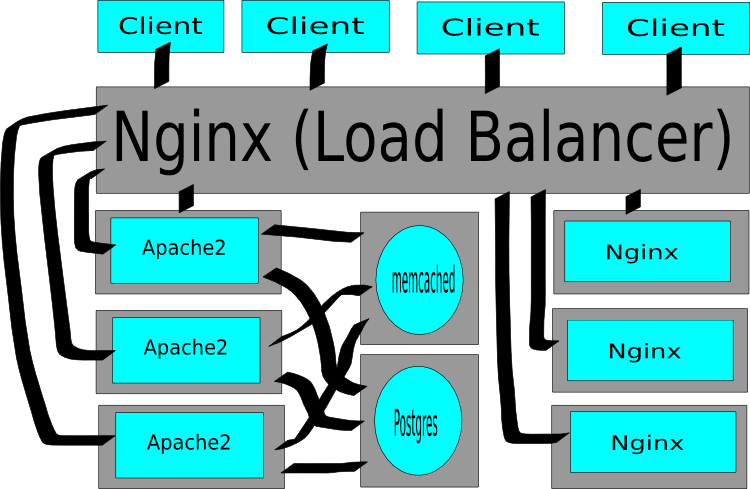
Admittedly this system does ask Nginx to perform as both a proxy and the static media server, and if serving static media requires more throughput than one machine can provide, you'll need to move to the server pool approach (which finalizes the separation of concerns).
Image of load-balanced setup for Django.
To a certain extent it's much easier to scale vertically (purchase a larger VPS or server) than to scale horizontally, and that should always be the first choice. However, should you reach a point where scaling vertically ceases to be cost-effective, the multi-server approach provides a tremendous amount of flexibility and allows higher gains per server due to specialization.
In the end, there isn't a right-wrong choice between using the single-server or the multi-server approach. While the multi-server approach will eventually out-perform the single-server approach, with limited resources may underperform it.
That said, my experience with the multi-server approach has been very positive, even with very limited resources (256 megabytes of RAM on a VPS), so--if you're willing to do some extra configuration--I'd personally recommend going with multi-server from the start.