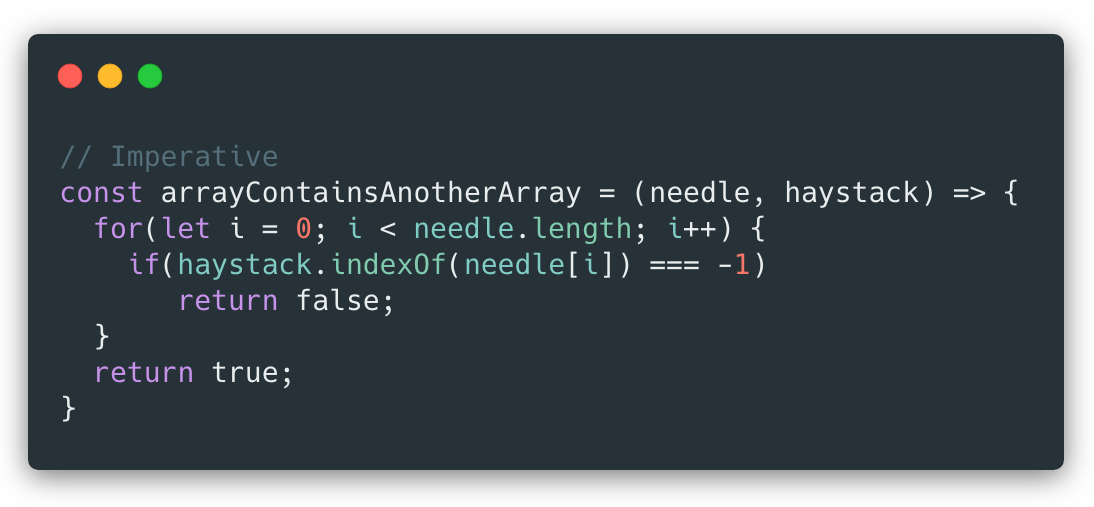
In this corner, weighing in at 7
lines of code, we have an imperative JS function, and in this corner,
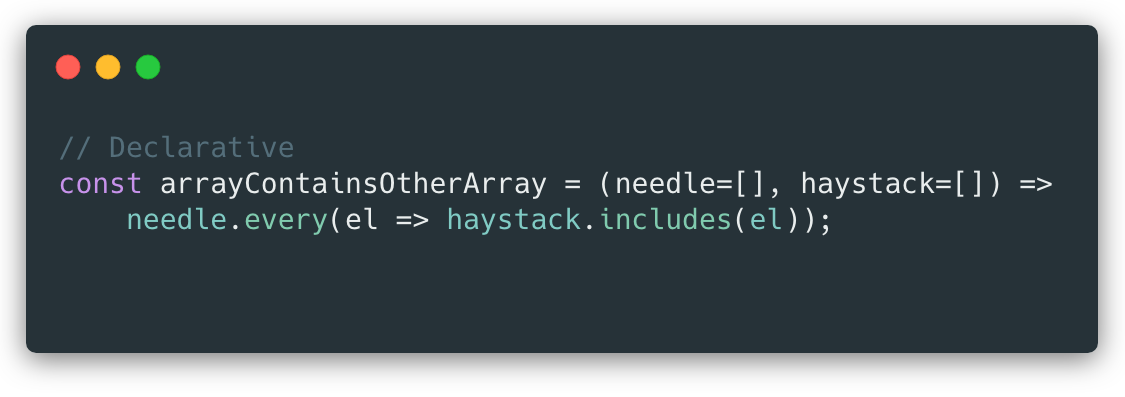
coming in at a lean, mean 2 LoC, declarative! Let's get ready to rumble!
by Cliff Hall·Feb. 12, 2019
Source: https://dzone.com/articles/imperative-vs-declarative-javascript
I was recently doing a JavaScript code review and came across
a chunk of classic imperative code (a big ol' for loop) and thought, here's an opportunity to improve the code by making it more declarative. While I was pleased with the result, I wasn't 100% certain how much (or even if) the code was actually improved. So, I thought I'd take a moment and think through it here.
Imperative and Declarative Styles
To frame the discussion, imperative code is where you explicitly spell out each step of how you want something done, whereas with declarative code
you merely say what it is that you want done. In modern JavaScript,
that most often boils down to preferring some of the late-model methods
of Array and Object over loops with bodies that do a lot of comparison
and state-keeping. Even though those newfangled methods may be doing the
comparison and state-keeping themselves, it is hidden from view and you
are left, generally speaking, with code that declares what it wants
rather being imperative about just how to achieve it.
The Imperative Code
Let's break down the thought process required to figure out what's going on here.
JavaScript isn't typed, so figuring out the return and argument types is the first challenge.
We can surmise from the name of the function and the two return
statements that return literal boolean values that the return type is
boolean.
The function name suggests that the two arguments may be arrays, and the use of needle.length and haystack.indexOfconfirms that.
The loop iterates the needlearray and exits the function returning false whenever the currently indexed value of the needle array is not found in the haystackarray.
If the loop completes without exiting the function, then we found no mismatches and true is returned.
Thus, if all the values of the needlearray (in any order) are found in the haystackarray, we get a true return, otherwise false.
The Declarative Code
Note:Tip o' the propeller beanie to Michael Luder-Rosefield who offered this solution which is much simpler than the previous version which used reduce.
That took fewer lines, but you still have to break it down to understand what it's doing. Let's see how that process differs.
JavaScript isn't typed, so figuring out the return and argument types is the first challenge.
We can surmise from the name of the function and the returned result of an array's every method that the return type is boolean.
The function name suggests that the two arguments may be arrays, as do the default values now added to the arguments for safety.
The needle.everycall names its current value el, and checks if it is present in the haystackarray using haystack.includes.
The needle.everycall returns true or false, telling us, quite literally, whether every element in the needlearray is included in thehaystackarray.
Comparisons
Now, let's weigh the relative merits of each implementation.
Imperative
Pros
The syntax of the venerable for loop is known by all.
The function will return immediately if a mismatch is found.
The for loop is probably faster (although it doesn't matter much at the small array size we're dealing with).
Cons
The code is longer: 7 lines, 173 characters.
Having two exits from a function is generally not great, but to achieve a single exit, it would need to be slightly longer still.
While the loop does iterate the entire length of the needlearray,
it has to be explicit about it, and we need to visually verify the
initializer, condition, and increment inspection. Bugs can creep in
there.
Comparing the result of the haystack.indexOfcall
to -1 feels clunky because the method name gives you no hint about what
it will return if the item isn't found (-1 as opposed to null or
undefined).
Declarative
Pros
The code is shorter: 2 lines, 102 characters.
The function will return immediately if a mismatch is found.
The result of a single expression is returned, so right away it's obvious what the function is attempting to do.
The use of needle.everyfeels
satisfying, because the method name implies that we'll get a true or
false result, AND we don't have to explicitly manage an iteration
mechanism.
The use of haystack.includesfeels
satisfying, because the method name implies that we'll get a true or
false result, AND we don't have to compare it to anything.
Cons
The everycall is probably slower (although it doesn't matter much at the small array size we're dealing with).
Conclusion
Both of these implementations could probably be improved upon. For one thing, and this has nothing to do with imperative vs declarative, the
function name and arguments could be given clearer names. The function
name seems to indicate that we want to know if one of the arrays is an
element of the other. The argument names actually seem to reinforce
that. In fact, we just want to know if the contents of the two arrays
match, disregarding order. This unintended misdirection creates mental
friction that keeps us from readily understanding either implementation upon first sight.
Aside from naming issues, it looks like the declarative approach has more pros than cons, so on a purely numerical basis, I'm going to declare it the winner.
Implementing
declarative code is widely expected to enhance readability. How it
affects performance is another question, and one that should certainly
be considered, particularly if a lot of data is being processed. If
there isn't much performance impact, then a more readable codebase is a
more manageable codebase.
If
you see other pros or cons I missed for either of these contenders, or
take issue with my approximation of their merits, please feel free to
leave your comments. And again, thanks to Michael Luder-Rosefieldfor doing just that on the Medium version of this post.
Credits to: Ewan Valentine
Source: https://dzone.com/articles/domain-driven-design-in-javascript
I wouldn't class myself as a
JavaScript developer, I always joke that it's a language I never meant to
learn. It's so pervasive now, it just happened. I go through phases of enjoying
it and despising it. But through the peaks and troughs of love and not quite
hate. One problem persisted: if I'm to be a good JS developer and write
functional JavaScript, how then do I write code in a way that implies a proper
domain model?
In traditional OO languages, such as
Java, C#, and even Go actually, it's easy to write code that's architected
around a domain design. You have classes, which are big and do a lot of stuff.
Which of course is something you generally avoid like the plague in JavaScript,
for fair enough reasons.
However, my code always seemed to
end up looking like this:
This looks okay, right? Sure! No big
problems here design-wise. However, when you have a large codebase entirely
made up of files such as this, in other words directories full of vaguely
grouped 'services,' individually exporting and importing single functions,
often vaguely named, and not obviously belonging to a domain when reading
through the code, it can very quickly feel as though you're dealing with a big
ball of unrelated scripts, rather than a well-architected software application.
I didn't want to return to classes
and traditional encapsulation. It felt like a step back after learning 'the
functional way™️. But, increasingly, I was finding JavaScript projects
difficult to read, 'bitty' and fragmented. I was seeing this everywhere, too!
It wasn't just my own hapless downfall. It seemed really common to see JS
projects with little to no design or architecture. I was ready to toss JS into
the bin for good and resume my position in the Golang ivory tower.
Until one of my engineers slipped a
new feature into one of our most noisy codebases, which jolted my attention.
Peering through reams and reams of
JavaScript, suddenly something stood out in a PR.
ScheduledJobs.run(jobId);
const
job = await ScheduledJobs.get(jobId);
Huh. Is that, a class? Surely not.
We don't do that here! No!
const
run = (jobId) => {};
const
stop = (jobId) => {};
const
pause = (jobId) => {};
const
get = (jobId) => {};
module.exports
= {
run,
stop,
pause,
get,
};
Praise Dijkstra, they're just
functions! Good old-fashioned functions. Suddenly I felt so, so very silly for
deliberating, Googling manically for weeks and weeks, and posting lengthy
diatribes on Twitter about how JavaScript was done; not fit for public consumption.
When all I needed to do was use what JavaScript gave me for this exact purpose:
modules! I got so caught up in trying to follow a paradigm that I forgot to be
pragmatic.
If I refactored my first arbitrary
example to use this pattern, in order to follow a domain design, maybe I'd have
something more like this:
I began writing my JavaScript in
this way, centered around these objects of grouped functions, which can still
be used in a functional way. But this pattern communicates purpose much better
than dealing in lots of single, un-grouped function calls. I find it made code
easier to follow, having that indicator of where this piece of code fits into
the bigger picture.
It was so simple in the end, and it
was something I already knew, even something I had already used hundreds of
times in the past. It all seemed so obvious! But it's easy to neglect concepts
such as DDD in languages like JavaScript, especially when you're on the pursuit
to functional enlightenment! But there is a happy medium.
Source: https://rollbar.com/blog/top-10-javascript-errors
To give back to our community of developers, we looked at our
database of thousands of projects and found the top 10 errors in
JavaScript. We’re going to show you what causes them and how to prevent
them from happening. If you avoid these "gotchas," it'll make you a
better developer.
Because data is king, we collected, analyzed, and ranked the top 10 JavaScript errors.
Rollbar collects all the errors for each project and summarizes how
many times each one occurred. We do this by grouping errors according to
their fingerprints.
Basically, we group two errors if the second one is just a repeat of
the first. This gives users a nice overview instead of an overwhelming
big dump like you’d see in a log file.
We focused on the errors most likely to affect you and your users. To
do this, we ranked errors by the number of projects experiencing them
across different companies. If we looked only at the total number of
times each error occurred, then high-volume customers could overwhelm
the data set with errors that are not relevant to most readers.
Here are the top 10 JavaScript errors:
Each error has been shortened for easier readability. Let’s dive
deeper into each one to determine what can cause it and how you can
avoid creating it.
1. Uncaught TypeError: Cannot read property
If you’re a JavaScript developer, you’ve probably seen this error
more than you care to admit. This one occurs in Chrome when you read a
property or call a method on an undefined object. You can test this very
easily in the Chrome Developer Console.
This can occur for many reasons, but a common one is improper
initialization of state while rendering the UI components. Let’s look at
an example of how this can occur in a real-world app. We’ll pick React,
but the same principles of improper initialization also apply to
Angular, Vue or any other framework.
A component’s state (e.g. this.state) begins life as undefined.
When you fetch data asynchronously, the component will render at
least once before the data is loaded – regardless of whether it’s
fetched in the constructor, componentWillMount or componentDidMount. When Quiz first renders, this.state.items is undefined. This, in turn, means ItemList gets items as undefined, and you get an error – "Uncaught TypeError: Cannot read property ‘map’ of undefined" in the console.
This is easy to fix. The simplest way: Initialize state with reasonable default values in the constructor.
classQuizextendsComponent{// Added this:constructor(props){super(props);// Assign state itself, and a default value for itemsthis.state ={
items:[]};}componentWillMount(){
axios.get('/thedata').then(res =>{this.setState({items: res.data});});}render(){return(<ul>{this.state.items.map(item =><li key={item.id}>{item.name}</li>)}</ul>);}}
The exact code in your app might be different, but we hope we’ve
given you enough of a clue to either fix or avoid this problem in your
app. If not, keep reading because we’ll cover more examples for related
errors below.
2. TypeError: ‘undefined’ is not an object (evaluating
This is an error that occurs in Safari when you read a property or
call a method on an undefined object. You can test this very easily in
the Safari Developer Console. This is essentially the same as the above
error for Chrome, but Safari uses a different error message.
3. TypeError: null is not an object (evaluating
This is an error that occurs in Safari when you read a property or
call a method on a null object. You can test this very easily in the
Safari Developer Console.
Interestingly, in JavaScript, null and undefined are not the same,
which is why we see two different error messages. Undefined is usually a
variable that has not been assigned, while null means the value is
blank. To verify they are not equal, try using the strict equality
operator:
One way this error might occur in a real world example is if you try
using a DOM element in your JavaScript before the element is loaded.
That’s because the DOM API returns null for object references that are
blank.
Any JS code that executes and deals with DOM elements should execute
after the DOM elements have been created. JS code is interpreted from
top to down as laid out in the HTML. So, if there is a tag before the
DOM elements, the JS code within script tag will execute as the browser
parses the HTML page. You will get this error if the DOM elements have
not been created before loading the script.
In this example, we can resolve the issue by adding an event listener that will notify us when the page is ready. Once the addEventListener is fired, the init() method can make use of the DOM elements.
The Script error occurs when an uncaught JavaScript error crosses
domain boundaries in violation of the cross-origin policy. For example,
if you host your JavaScript code on a CDN, any uncaught errors (errors
that bubble up to the window.onerror handler, instead of being caught in
try-catch) will get reported as simply "Script error" instead of
containing useful information. This is a browser security measure
intended to prevent passing data across domains that otherwise wouldn’t
be allowed to communicate.
To get the real error messages, do the following:
1. Send the Access-Control-Allow-Origin header
Setting the Access-Control-Allow-Origin header to *
signifies that the resource can be accessed properly from any domain.
You can replace * with your domain if necessary: for example, Access-Control-Allow-Origin: www.example.com.
However, handling multiple domains gets tricky, and may not be worth
the effort if you’re using a CDN due to caching issues that may arise.
See more here.
Here are some examples on how to set this header in various environments:
Apache
In the folders where your JavaScript files will be served from, create an .htaccess file with the following contents:
Header add Access-Control-Allow-Origin "*"
Nginx
Add the add_header directive to the location block that serves your JavaScript files:
Add the following to your asset backend where JavaScript files are served from:
rspadd Access-Control-Allow-Origin:\ *
2. Set crossorigin="anonymous" on the script tag
In your HTML source, for each of the scripts that you’ve set the Access-Control-Allow-Origin header for, set crossorigin="anonymous" on the SCRIPT tag. Make sure you verify that the header is being sent for the script file before adding the crossorigin property on the script tag. In Firefox, if the crossorigin attribute is present but the Access-Control-Allow-Origin header is not, the script won’t be executed.
5. TypeError: Object doesn’t support property
This is an error that occurs in IE when you call an undefined method. You can test this in the IE Developer Console.
This is equivalent to the error "TypeError: ‘undefined’ is not a
function" in Chrome. Yes, different browsers can have different error
messages for the same logical error.
This is a common problem for IE in web applications that employ
JavaScript namespacing. When this is the case, the problem 99.9% of the
time is IE’s inability to bind methods within the current namespace to
the this keyword. For example, if you have the JS namespace Rollbar with the method isAwesome. Normally, if you are within the Rollbar namespace you can invoke the isAwesome method with the following syntax:
this.isAwesome();
Chrome, Firefox and Opera will happily accept this syntax. IE, on the
other hand, will not. Thus, the safest bet when using JS namespacing is
to always prefix with the actual namespace.
Rollbar.isAwesome();
6. TypeError: ‘undefined’ is not a function
This is an error that occurs in Chrome when you call an undefined
function. You can test this in the Chrome Developer Console and Mozilla
Firefox Developer Console.
As JavaScript coding techniques and design patterns have become
increasingly sophisticated over the years, there’s been a corresponding
increase in the proliferation of self-referencing scopes within
callbacks and closures, which are a fairly common source of this/that
confusion.
Consider this example code snippet:
functionclearBoard(){alert("Cleared");}
document.addEventListener("click",function(){this.clearBoard();// what is “this” ?});
If you execute the above code and then click on the page, it results
in the following error "Uncaught TypeError: this.clearBoard is not a
function". The reason is that the anonymous function being executed is
in the context of the document, whereas clearBoard is defined on the window.
A traditional, old-browser-compliant solution is to simply save your reference to this in a variable that can then be inherited by the closure. For example:
var self=this;// save reference to 'this', while it's still this!
document.addEventListener("click",function(){
self.clearBoard();});
Alternatively, in the newer browsers, you can use the bind() method to pass the proper reference:
This is an error that occurs in Chrome under a couple of
circumstances. One is when you call a recursive function that does not
terminate. You can test this in the Chrome Developer Console.
It may also happen if you pass a value to a function that is out of
range. Many functions accept only a specific range of numbers for their
input values. For example, Number.toExponential(digits) and Number.toFixed(digits) accept digits from 0 to 100, and Number.toPrecision(digits) accepts digits from 1 to 100.
var a =newArray(4294967295);//OKvar b =newArray(-1);//range errorvar num =2.555555;
document.writeln(num.toExponential(4));//OK
document.writeln(num.toExponential(-2));//range error!
num =2.9999;
document.writeln(num.toFixed(2));//OK
document.writeln(num.toFixed(105));//range error!
num =2.3456;
document.writeln(num.toPrecision(1));//OK
document.writeln(num.toPrecision(0));//range error!
8. TypeError: Cannot read property ‘length’
This is an error that occurs in Chrome because of reading length
property for an undefined variable. You can test this in the Chrome
Developer Console.
You normally find length defined on an array, but you might run into
this error if the array is not initialized or if the variable name is
hidden in another context. Let’s understand this error with the
following example.
var testArray=["Test"];functiontestFunction(testArray){for(var i =0; i < testArray.length; i++){
console.log(testArray[i]);}}testFunction();
When you declare a function with parameters, these parameters become
local ones. This means that even if you have variables with names testArray, parameters with the same names within a function will still be treated as local.
You have two ways to resolve your issue:
Remove parameters in the function declaration statement (it turns out
you want to access those variables that are declared outside of the
function, so you don’t need parameters for your function):
var testArray =["Test"];/* Precondition: defined testArray outside of a function */functiontestFunction(/* No params */){for(var i =0; i < testArray.length; i++){
console.log(testArray[i]);}}testFunction();
Invoke the function passing it the array that we declared:
var testArray =["Test"];functiontestFunction(testArray){for(var i =0; i < testArray.length; i++){
console.log(testArray[i]);}}testFunction(testArray);
9. Uncaught TypeError: Cannot set property
When we try to access an undefined variable it always returns undefined and we cannot get or set any property of undefined. In that case, an application will throw “Uncaught TypeError cannot set property of undefined.”
For example, in the Chrome browser:
If the test object does not exist, error will throw “Uncaught TypeError cannot set property of undefined.”
10. ReferenceError: event is not defined
This error is thrown when you try to access a variable that is
undefined or is outside the current scope. You can test it very easily
in Chrome browser.
If you’re getting this error when using the event handling system,
make sure you use the event object passed in as a parameter. Older
browsers like IE offer a global variable event, and Chrome automatically
attaches the event variable to the handler. Firefox will not
automatically add it. Libraries like jQuery attempt to normalize this
behavior. Nevertheless, it’s best practice to use the one passed into
your event handler function.
It turns out a lot of these are null or undefined errors. A good static type checking system like Typescript
could help you avoid them if you use the strict compiler option. It can
warn you if a type is expected but has not been defined. Even without
Typescript, it helps to use guard clauses to check whether objects are
undefined before using them.
We hope you learned something new and can avoid errors in the future,
or that this guide helped you solve a head scratcher. Nevertheless,
even with the best practices, unexpected errors do pop up in production.
It's important to have visibility into errors that affect your users,
and to have good tools to solve them quickly.
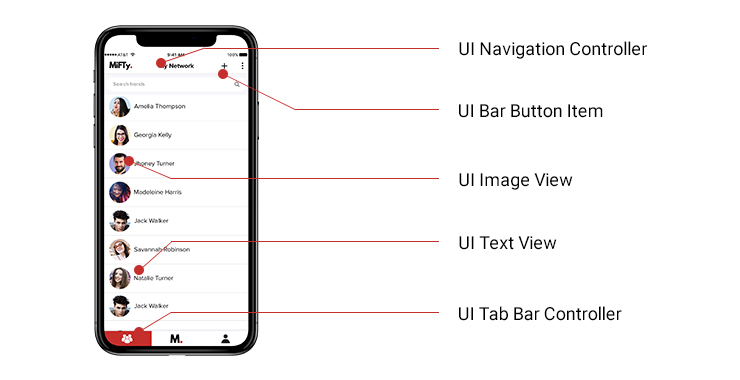
Let’s take a look at one screen from an app that is purely React Native and ask ourselves what is the UI that we see here.
Is this HTML? Is this a webview like other implementations in PhoneGap or Cordova?
The answer is, without a doubt, no. The views
in React Native are purely native views so, from our app, the navigation
controller that you see here at the top bar is the
UINavigationController. Now, if you are an iOS developer, you would see
these are the same UI views that you use in your native apps.
If
I had shown you the same screen on Android, you would see that the
implementation is completely different. It renders to the native views.
If the UI is completely native with React Native, where is the
JavaScript?
Where Is the JavaScript?
JavaScript is what running under the hood. Where you as a
developer specify the business logic and which components you want, and
then the framework renders it for you. To understand this better, let's
dive into React Native a little deeper and see the architecture from the
inside.
Understanding React Native Architecture
Consider that there are two realms running side-by-side in
your app. You have the JavaScript realm and you have the native realm.
JavaScript Realm
The JavaScript realm is where you program in JavaScript,
naturally. The code there is running on a JavaScript engine.
Specifically, React Native uses jscore, an open source JavaScript engine
for WebKit. You are probably familiar with other engines like V8. They
do the same things and this engine is running inside your app on one of
the threads. Your app is a process that has several threads in it.
JavaScript is just one of them.
Native Realm
In the native realm, you still develop in Objective-C and/or
Swift if you are on iOS or with Java if you are on Android. You use the
native, platform-specific languages that you used before and you have
the main UI thread as usual. In all platforms, you can usually change
the UI only from the main UI thread and you can create as many
background threads as you want.
The Bridge
These two realms are different and connecting these two
realms is the bridge. React Native is a very important construct in this
entire setup. Did you ever try to debug a React Native application
using Chrome, for example? So, when you debug a React Native application
using Chrome, then you have the two realms actually running on
different computers. You can run the JavaScript role entirely inside
Chrome itself. You can debug it inside the Chrome debugger and you have
the native realm still running on your phone. Then, instead of going
inside your app, you would go through a WebSocket. The bridge, which is
just a communication protocol, can travel over WebSocket as well.


 If
I had shown you the same screen on Android, you would see that the
implementation is completely different. It renders to the native views.
If the UI is completely native with React Native, where is the
JavaScript?
If
I had shown you the same screen on Android, you would see that the
implementation is completely different. It renders to the native views.
If the UI is completely native with React Native, where is the
JavaScript? 