Translate

Thursday, February 18, 2021

5 Types of Tests To Perform On Your APIs

From functional tests to penetration tests, this blog covers the 5 most vital types of tests to consider for holistic web API testing and includes best practices.


API Test is crucial for the software systems to function at high quality. Every app you build nowadays completely relies on Application Programming Interfaces. Application Programming Interface acts as the center level between the database and presentation layer in the software development procedure.  It is mainly the channel that links the client to the server, drives business procedures, and gives the services which give worth to users.  They allow data exchange and communication from one to another software system. That means it is critical to thoroughly verify and test Application Programming Interfaces before rolling out the product to the end-users or customers. 

What is API Test?

API test is a series of QA activities that comprise sending calls to the API, getting the result, and validating the response of the system against the definite input parameters, in precise, HTTP status codes, the data’s accuracy and data’s format, and error codes. Generally, API test is executed on Application Programming Interfaces generated by the in-house development team. We do not text 3rd party Application Programming Interfaces; however, we can test the mode our software accepts their requests. The approach to the Application Programming Interface test principally depends on the form of API. There are web Application Programming Interfaces, aka web services, database Application Programming Interfaces that connect apps with database management systems, OSs Application Programming Interfaces, and remote APIs to access resources placed outside the device demanding them.

Few Common Reasons Why You Should Perform API Testing:

1.    To ensure the Application Programming Interface does what it is supposed to perform.

2.    To make certain that the Application Programming Interface can manage the load.

3.    To detect the modes, the users can mess things up.

4.    To make sure that the Application Programming Interfaces work across browsers, devices, and OSs.

5.    With the Application Programming Interface test, there could be expenses involved because of system failure.

Five Types of Tests to Perform On Your APIs:

1. API Functional Tests

The functional test is still a broad method to test but is less broad than those under the Validation test. This kind of test is simply a test of particular functions within the codebase. These functions consecutively represent precise scenarios to make sure that the Application Programming Interface functions within accepted parameters and those glitches are handled perfectly when the outcomes are outside of the projected parameters.

In short, the functional test is mainly the evaluation of particular functions within the codebase. It ensures the Application Programming Interface mainly functions within projected parameters, meaning it:

•    Returns the desired outcome for a specified input.

•    Handles bugs when the output is outside of the accepted parameters.

One of the functional test kinds is Negative or Positive tests. Negative tests verify how an Application Programming Interface reacts to each possible type of wrong input. A positive test checks the correct functioning of the Application Programming Interface when the input conforms to the standard. If positive testing cases fail, it is a bad signal, as it means the app cannot function even under ideal situations. 

2. API Validation Tests

Validation test is the last moves in the development procedure; however, it is the most significant testing that can be performed. This form of test is typically executed at the very end of the common development procedure, particularly after verification of the Application Programming Interfaces parts and functions is completed. While many of the testing deal with precise facets of the codebase or particular functions, validation test is a very much high-level consideration.

Validation test is critically a series of easy questions applied to the sum of the project. The queries count: 

•    Effectiveness — Is the Application Programming Interface the optimized, the most accurate, and capable means of doing what is required? Can any codebase be changed or removed to eliminate impairments to the common service? 

•    Behavior — Is the Application Programming Interface accessing the right data in the rightly defined manner? Is the Application Programming Interface accessing too much information; is it gathering this fact correctly given the secrecy and reliability needs of the dataset?

•    Product — Did we build an accurate product? Is the Application Programming Interface itself the right product for the concern provided, and did the Application Programming Interface experience any noteworthy code bloat or trait creep that took an otherwise focused and lean execution into an indefensible direction?

Such queries typically serve to validate the Application Programming Interface as a holistic solution and are carried out after the Application Programming Interface is developed against agreed upon as well as established criteria to make sure accurate environment integration, the deliverance of precise end goals, and outputs, and adherence to standards. Eventually, this kind of testing can be simply supposed to be an assurance of the right development against the definite user requirements and needs.

3. API Performance Tests

To make sure the Application Programming Interface can hold the higher or expected load, QA specialists validate its performance and functionality by artificially crafting or simulating Application Programming Interface calls. Some of the kinds of Application Programming Interface performance testing:

  • Soak test — Load testing that runs over an extended period can disclose system instabilities such as API memory leaks. Thus, QA testers leave automated soak testing running. On the third day, it can reveal to you whether any discarded behavior has emerged.
  • Load test — The point of the load test is to calculate where the boundary of system performance under heavy load lies. That is why the QA tester computes server conditions, response times, throughput, etc., whilst boosting the number of calls.
  • Stress test — The idea is to slowly and steadily raise the count of virtual users to discover the point at which the Programming Interface starts throwing glitches, stops responding, or slows down.
  • Scalability test — To ensure that your system performance scales as per the changing load. To act so, augment the number of incoming requests & check whether it causes a relative boost in response time.
  • Spike test — Contrary to the stress test, an Application Programming Interface goes through a sudden spike of users. This test examines whether the Application Programming Interface can stabilize and return to normal performance after that.
  • Peak test — Just like the soak test, here QA tester subjects the Application Programming Interface to the heaviest load while decreasing the attack time.

4.  API UI Tests

While both functional and validation tests, to some extent generalized in their approaches, the user interface for the test is more precise, UI test is exactly what it says– a test of the UI for your Application Programming Interface and its component parts. This form of testing is particularly concerned with the function of the User Interface, whether that interface relies upon command-line endpoint calls or graphical in nature.

This is in several ways less of testing of the Application Programming Interface and more testing of the interface that ties into the Application Programming Interface and the developer experience of making use of that interface. Although not a straight test of the Application Programming Interface in terms of the codebase, this offers a generalized view of the efficiency, usability, and health of both the back-end and the front-end. In reality, this is why the User Interface test is often used as an alternative for the functional tests — in several ways, this testing serves a similar function, albeit in a more general sense and lesser complete. 

5. API Security Tests

Penetration, security, and Fuzz tests are the elements of the security auditing procedure aimed to test an API for risks and vulnerabilities from outer threats.

Security tests, penetration tests, and fuzz tests are often launched as 3 different elements of a greater security audit procedure, and for this reason, they will be discussed mutually. These kinds of testing are well-designed to make sure that the execution of the Application Programming Interface is safer from external threats.

  • Security test  This type of test, as earlier mentioned, includes fuzz and penetration tests but entails extra steps, counting validation of encryption methods & validating the design of the access control solution for the Application Programming Interface. This counts user rights management & validating permission checks for resource admittance.
  • Penetration test — Taking a security test a step further, in the pen test, definite Application Programming Interface functions, procedures, resources, or the complete Application Programming Interface is under attack from externally. This decides whether the risk vector can be attained. 
  • Fuzz test — The final stage in the security audit testing the Application Programming Interface at its absolute limits. Forcedly inputting enormous amounts of random information tests whether the Application Programming Interface will stand it or finish up with depressing behavior like an overflow or forced crash. 

'Top Choice' Tools for Automated Application Programming Interface Tests:

API test is not distinct from other forms of the test. However, it requires precise tools devoted to automating it. They differ depending on the programming language they are based upon. Using an Application Programming Interface test tool, QAs typically either take benefit of its extraordinary solutions or develop a tailored framework from its elements.

  1. Apache JMeter — It is a time-tested API test tool initially used for the load tests. Nowadays, jMeter also supports stress, regression, and functional testing on distinct protocols. It is an open-source and free tool with customized scripting functionalities that necessitate advanced programming skills.
  2. Postman —It is presently the most popular tool utilized in Application Programming Interface tests. Started as a browser extension for Application Programming Interface validation, now with integrated automated test traits, this tool is much more than merely an HTTP client.
  3. REST Assured — It is a Java library to create a REST API test tool script. Therefore, to begin with, you will have to employ a new Java project initially and then embrace it as a library for any project. The documentation of it is accumulated inside the Github repository. This tool is the better fit for functional tests of REST API solutions, and it requires robust code skills for creating tests.
  4. Requests — It is an open-source or free Python HTTP library, was launched under the Apache2 License to simplify HTTP requests.        
  5. SoapUI — It is an Application Programming Interface test tool in SmartBear’s ReadyAPI suite. It also has LoadUI for the performance tests. 
  6. Katalon —Designed mainly for UI testing, it is also an integrated environment intended to generate and execute Application Programming Interface testing without difficulty.

7 Best Practices to Keep Tests Running Efficiently:

•    Always start with categorizing testing cases by kind.

•    Cite what names the Application Programming Interfaces must be called.

•    Have definite criteria mentioned for the Application Programming Interfaces.

•    Rank the Application Programming Interface function calls.

•    Keep the APIs testing self-contained (independent of one another).

•    Do not bring about a testing chain when you are in the test procedure.

•    Pay close interest to the distinct procedures — well-implanted testing is best in the long term.

Final Verdict

Overall, the Application Programming Interface test is an essential part of the software quality assurance procedure. You need the right tool as well as an approach for improving your test results. The more your test procedure is structured; the better will be the outputs of the testing. 

Monday, February 8, 2021

Java Cheat sheet

Source: Table of Contents | Java-Cheatsheet (yungnickyoung.github.io)

Java-Cheatsheet

Java notes cheatsheet, focusing on fundamentals and useful interview tips


Table of Contents

▲ TOP

Scope of Variables

LocalInstanceClass/Static
Declared in methods, constructors, or blocksDeclared in a class, but outside a method/blockSame as instance, but with static keyword
Created when block is entered, destroyed upon block exitCreated when an object is created (new). When space is allocated for a block on the heap, a slot for each instance var is created.Created when program starts, destroyed when program ends.
No access modifiersAccess modifiers OK. Visible to all methods & constructors in class.Access modifiers OK. Visible to all methods & constructors in class.
No default values.Have default values.Have default values.

▲ TOP

Access Modifiers and Visibility

N/APublicProtectedDefaultPrivate
Same ClassYYYY
Same Package SubclassYYYN
Same Package Non-subclassYYYN
Different Package SubclassYYNN
Different Package Non-subclassYNNN
  • Top-level Classes & interfaces cannot be private or protected
  • Methods declared public in superclass must be public in all subclasses
  • Methods declared protected in superclass must be public or protected in subclasses
  • Private methods are not inherited

▲ TOP

Bitwise Operations

Width vs. Possible Values

The number of bits used (width) determines the numbers that can be encoded: 2^n total.

  • Unsigned: 0 through 2^n - 1
  • 2’s Complement: -2^(n-1) through 2^(n-1) - 1

Numerical primitives

  • byte: 8 bits, e.g. from -128 to 127
  • short: 16 bits
  • char: unsigned 16 bits
  • int: 32 bits
  • long: 64 bits

Operators

For the following examples, assume a = 60, b = 13, c= -2. Their binary 2’s complement representations are below.
a = 0011 1100
b = 0000 1101
c = 1111 1110

OperationFunctionExample
&ANDa&b = 0000 1100 (12)
\|ORa\|b = 0011 1101 (61)
^XORa^b = 0011 0001 (49)
~Complement (bitwise inversion)~a = 1100 0011 (-61 in 2's complement)
<<Left shifta << 2 = 1111 0000 (-16 in 2's complement)
>>Arithmetic shift rightc >> 2 = 1111 1111 (-1)
>>>Logical shift right (zero-fill)c >>> 2 = 0111 1111 (127)

Useful Tricks

  • Note that in the following examples, x, 0, and 1 refer to a single bit, not a multi-bit integer
    • XOR
      • x ^ 0 = x
      • x ^ 1 = ~x
        • For a multi-bit integer n, n ^ -1 = ~n. This works because -1 in 2’s complement is represented as 11111111…, so each bit gets XOR’d with 1
      • x ^ x = 0
    • AND
      • x & 0 = 0
      • x & 1 = x
        • For a multi-bit integer n, n & -1 = n. This works because -1 in 2’s complement is represented as 11111111…, so each bit gets AND’d with 1
      • x & x = x
    • OR
      • x | 0 = x
      • x | 1 = 1
      • x | x = x
  • Swapping two values without a temporary variable
    // E.g. a = 2 (0b0010), b = 5 (0b0101)
    a = a ^ b    // a = 7 (0b0111)
    b = a ^ b    // b = 2 (0b0010)
    a = a ^ b    // a = 5 (0b0101)
    

▲ TOP

Exceptions

Three types:

  1. Checked Exceptions: Notified by the compiler at compile-time
  2. Unchecked Exceptions: Runtime Exceptions
  3. Errors: Problems that arise beyond the control of the user and programmer, e.g. stack overflow

Exception Hierarchy

alt text

alt text

try-with-resources

Automatically closes the resources used, e.g.

try (FileReader fr = new FileReader(filepath)) {
    // use the resource
} catch () {
    // handle the exception
}

User-defined Exceptions

  • Must be a child of Throwable
  • If checked exception, must extend Exception
  • If unchecked exception, must extend RuntimeException

▲ TOP

Polymorphism

  • Any object that can pass an IS-A test is polymorphic
    • All objects are polymorphic to the Object class
  • Objects can only be accessed through reference variables
    • A reference variable can only be of one type, and that type cannot be changed once declared. However, the reference variable can be reassigned to other objects (given that it is not final)
      • The type of a reference variable determines the methods it can invoke on an object
      • A reference variable can refer to any object of its declared type or any subtype
      • A reference variable can be declared as a class or interface type

Example: Given the following:

public interface Vegetarian { ... }
public class Animal { ... }
public class Deer extends Animal implements Vegetarian { ... }

then a Deer IS-A Animal, Vegetarian, Deer, and Object

Thus the following are all legal:

Deer d = new Deer();
Animal a = d;
Vegetarian v = d;
Object o = d;

All four of these references refer to the same Deer object on the heap.

Static Polymorphism

Static Polymorphism is polymorphism that is resolved at compile time. Method overloading is an example of static polymorphism.

For example, say we have the following code:

int add(int a, int b) {
    return a + b;
}

int add(int a, int b, int c) {
    return a + b + c;
}

...

int x = add(1, 2);    // Calls the first add method. x = 3
int y = add(1, 2, 3); // Calls the second add method. y = 6

When we make a call to the add function, we can tell which function will be called before even running our code, based on the type and number of our arguments. And, in fact, the compiler does just this – it resolves which method will be called at compile time, rather than waiting until runtime.

Dynamic Polymorphism

Dynamic Polymorphism is polymorphism that is resolved at runtime. Method overriding is an example of dynamic polymorphism.

For example, consider the following code:

class Parent {
    public void myMethod() {
        System.out.printline("I am the parent");
    }
}

public class Child extends Parent {
    public void myMethod() {
        System.out.printline("I am the child");
    }
    
    public static void main(String[] args) {
        Parent p = new Child();
        Child c = new Child();
        p.myMethod(); // I am the child
        c.myMethod(); // I am the child
    }
}

Here, we instantiate two Child objects, one using a Parent reference p, and the other using a Child reference c.

While invoking c.myMethod(), the compiler sees myMethod() in the Child class at compile time, and the JVM invokes myMethod() in the Child class at run time.

myMethod() on p is quite different because p is a Parent reference. When the compiler sees p.myMethod(), the compiler sees the myMethod() method in the Parent class. Here, at compile time, the compiler used myMethod() in Parent to validate this statement. At run time, however, the JVM invokes myMethod() in the Child class.

This behavior is also referred to as virtual method invocation, and these methods are referred to as virtual methods. An overriding method is invoked at runtime, no matter the data type the reference is that was used in the source code at compile time.

Method Overriding

Rules for overriding methods (NOT overloading!)

  • The argument list must be the same
  • The return type must be the same or a subtype of the return type declared in the overriden method
  • The access level cannot be more restrictive than the overidden method’s
  • Instance methods can only be overridden if they are inherited by the subclass
  • final methods cannot be overriden
  • A static method can be redeclared, but not overridden
  • If a method cannot be inherited, it cannot be overriden
  • Constructors cannot be overriden

For more information, see Static vs Dynamic Binding.

▲ TOP

Static vs Dynamic Binding

Association of a method call to a method body is known as binding. There are two types of binding:

  1. Static Binding (aka Early Binding): Binding resolved at compile time
  2. Dynamic Binding (aka Late Binding): Binding resolved at run time

In Java, static binding is used for the binding of static, private, and final methods. This is because these methods cannot be overridden, and thus calls to such methods are necessarily unambiguous. The type of the class these methods belong to can be determined at compile time.

This is important to know, for example, in situations where you might call a static method via an object (all though this is generally ill-advised), like in the example below.

class Human {
   public static void walk() {
       System.out.println("Human walks");
   }
}
class Boy extends Human {
   public static void walk(){
       System.out.println("Boy walks");
   }
   
   public static void main(String args[]) {
       Human b = new Boy();    // Reference is type Human, object is type Boy
       Human h = new Human();  // Reference is type Human, object is type Human
       b.walk();  // Human walks
       h.walk();  // Human walks
   }
}

On the other hand, dynamic binding is used when the compiler is not able to resolve the binding at compile time:

class Human {
   public void walk() {
       System.out.println("Human walks");
   }
}
class Boy extends Human {
   public void walk(){
       System.out.println("Boy walks");
   }
   
   public static void main(String args[]) {
       Human b = new Boy();    // Reference is type Human, object is type Boy
       Human h = new Human();  // Reference is type Human, object is type Human
       b.walk();  // Boy walks
       h.walk();  // Human walks
   }
}

Note that, as detailed in the Polymorphism section, the binding of overloaded methods is static, while the binding of overridden methods is dynamic.

▲ TOP

Interfaces

An interface may have abstract methods, default methods, static methods, constants, and nested types. Method bodies exist only for default and static methods.

An interface contains behaviors that a class implements. All methods of an interface must be defined in the implementing class, unless the class itself is abstract.

Interfaces are similar to classes in that:

  • They can contain any number of methods
  • Saved as InterfaceName.java

Interfaces are different from classes in that:

  • Interfaces cannot be instantiated
  • Interfaces don’t have constructors
  • All interface methods are implicitly abstract
  • An interface cannot have instance fields; only static final fields (constants)
  • An interface can extend multiple interfaces (classes can implement multiple interfaces - but they cannot extend multiple classes)

Interfaces and their methods are implicitly abstract. Their methods are implicitly public.

Tagging Interfaces

The most common use of extending interfaces occurs when the parent interface doesn’t have any methods. Example: The MouseListener interface in java.awt.event extends java.util.EventListener, which is defined as follows:

package java.util;
public interface EventListener {}

Thus, an interface with no methods is a tagging interface.
These have two basic design purposes:

  1. Creates a common parent
  2. Adds a data type to a class. A class that implements a tagging interface becomes an interface type through polymorphism

▲ TOP

Nested Classes

Types of nested classes:

                                Nested classes
                                      |
                   ___________________|__________________
                  |                                      |
            Inner classes                      Static nested classes
    ______________|_________________
   |              |                 |
 Inner      Method-local        Anonymous
classes     inner classes     inner classes

Java does NOT support multiple inheritance.
This means a class cannot inherit multiple classes.
However, a class can implement multiple interfaces.

▲ TOP

Java Generics

public static <E> void printArray(E[] array) {
    for (E element : array)
        System.out.print(element + " ");
}
...
// Example usage:
Integer[] intArr = {1, 2, 3};
Double[] doubleArr = {1.1, 2.2, 3.3};

printArray(intArr);
printArray(doubleArr);

You can also bound the type of the Generic parameters, e.g.

public static <T extends Comparable<T>> T max(T x, T y) { ... }

Can be applied to Generic classes as well, e.g.

public class Box<T> {
    private T t;
    ....
 }

▲ TOP

Serialization

Serialization allows an object to be represented as a sequence of bytes that includes the object’s data as well as info about the object’s type and the types of data stored in the object.

After a serialized object has been written to a file, it can be read from the file and deserialized to recreate the object in memory.

For a class to be serialized, it must meet two conditions:

  1. It must implement the java.io.Serializable interface
  2. All of the fields must be serializable. If a field is not serializable, it must be marked with the transient keyword

Example of serialization:

try {
    FileOutputStream fileOut = new FileOutputStream("/tmp/employee.ser");
    ObjectOutputStream out = new ObjectOutputStream(fileOut);
    out.writeObject(e); // Assume e is an Employee object
    out.close();
    fileOut.close();
}

The data for object e is now saved in /tmp/employee.ser.
Note: convention is to use .ser (?)

Example of deserialization:

Employee e = null;
try {
    FileInputStream fileIn = new FileInputStream("/tmp/employee.ser");
    ObjectInputStream in = new ObjectInputStream(fileIn);
    e = (Employee)in.readObject();
    in.close();
    fileIn.close();
}

The return value of readObject() should be cast to the proper class.

▲ TOP

Multithreading

Lifecycle of a thread:

  • New: a new thread begins in this state where it remains until the program starts the thread
  • Runnable: executing its task
  • Waiting: waiting for another thread to finish a task
  • Timed Waiting: waiting for a certain amount of time
  • Terminated: dead

Thread priorities range from MIN_PRIORITY (a constant of 1) to MAX_PRIORITY (a constant of 10).

There are two ways of creating a thread:

  1. Implement the Runnable interface
    • If you want a class to be executed as a thread, it must implement Runnable. This method takes three basic steps:
    1. Implement a run() method
    2. Instantiate a Thread object, like so: Thread (Runnable threadObj, String threadName), where threadObj is an instance of a class that implements Runnable, and threadName is the name given to the new thread
    3. Start a Thread object with start(), which executes a class to the class’s run() method
  2. Extend the Thread class
    • This approach provides more flexibility in handling multiple threads created using available methods in the Thread class.
    1. Override the run() method in Thread class
    2. After creating the Thread object, start it with the start() method

Thread Synchronization

What if two threads try to access the same resources? For example, if multiple threads try to write to the same file at the same time, they could corrupt the file.

Monitors allow us to make sure only one thread can access a shared resource at a time. Each object in Java has a monitor associated with it, which a thread can lock or unlock. Only one thread at a time may hold a lock on a monitor.

Use a synchronized block to contain shared data.

Inter-thread Communication

Threads can be built to exchange information using three simple methods:

  1. public void wait() – causes the current thread to wait until another thread invokes notify()
  2. public void notify() – wakes up a single thread that is waiting on the object’s monitor
  3. public void notifyAll() – wakes up all threads that called wait() on the same object

All three methods can only be called from within a synchronized context.

Thread Deadlock

Situation where two or more threads are blocked forever, waiting for each other. Occurs when multiple threads need the same locks, but obtain them in a different order. Obviously, we want to avoid this!

▲ TOP

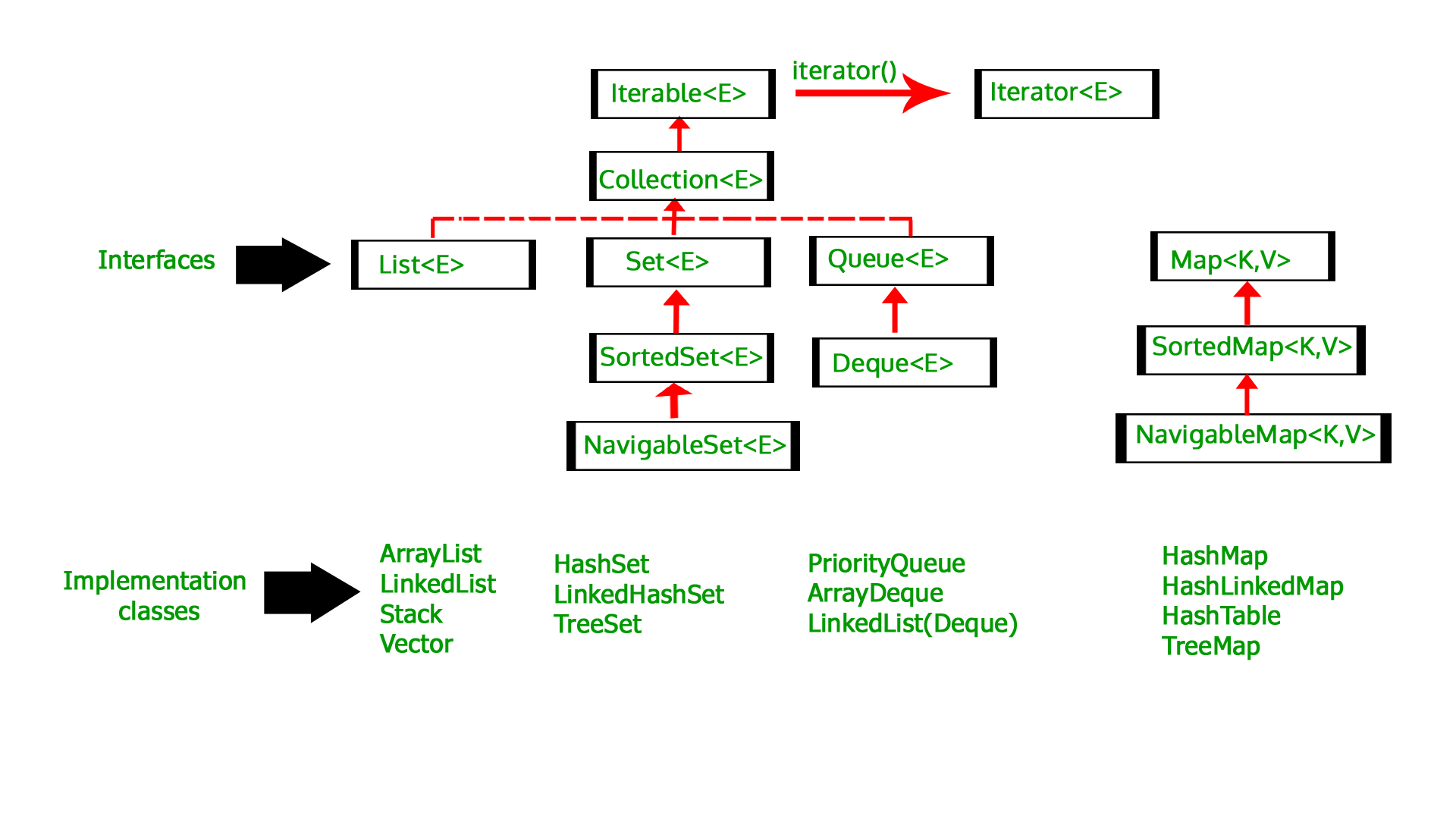
Java Collections Framework

Overview

alt text

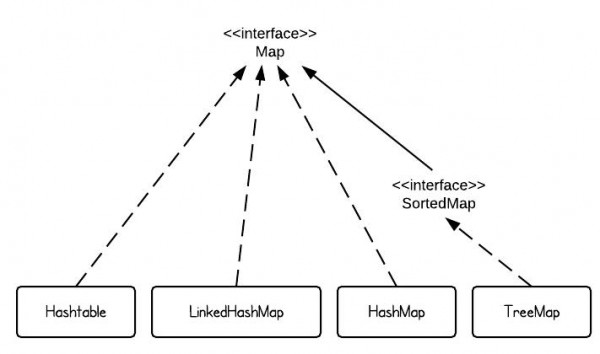
Maps

There are four commonly used map implementations in Java: HashMap, TreeMap, LinkedHashMap, and Hashtable.

alt text

To summarize them:

  • HashMap makes no guarantees on the ordering of keys or values.
  • TreeMap will iterate according to the “natural ordering” of the keys according to their compareTo() method (or an externally supplied Comparator). Additionally, it implements the SortedMap interface, which contains methods that depend on this sort order. It is implemented via a red-black tree.
  • LinkedHashMap is a subclass of HashMap with a linked-list implementation. It will iterate in the order in which the entries were put into the map.
  • Hashtable is an obsolete class from the days of Java 1.1 before the collections framework existed. It should not be used anymore, because its API is cluttered with obsolete methods that duplicate functionality, and its methods are synchronized (which can decrease performance and is generally useless). Furthermore, in a Hashtable, neither the key nor value can be null. This is not the case with HashMap, which may have a single null key and multiple null values.

The figure below summaries many of these differences.

╔══════════════╦═════════════════════╦═══════════════════╦═════════════════════╗
║   Property   ║       HashMap       ║      TreeMap      ║     LinkedHashMap   ║
╠══════════════╬═════════════════════╬═══════════════════╬═════════════════════╣
║ Iteration    ║  no guarantee order ║ sorted according  ║                     ║
║   Order      ║ will remain constant║ to the natural    ║    insertion-order  ║
║              ║      over time      ║    ordering       ║                     ║
╠══════════════╬═════════════════════╬═══════════════════╬═════════════════════╣
║  Get/put     ║                     ║                   ║                     ║
║   remove     ║         O(1)        ║      O(log(n))    ║         O(1)        ║
║ containsKey  ║                     ║                   ║                     ║
╠══════════════╬═════════════════════╬═══════════════════╬═════════════════════╣
║              ║                     ║   NavigableMap    ║                     ║
║  Interfaces  ║         Map         ║       Map         ║         Map         ║
║              ║                     ║    SortedMap      ║                     ║
╠══════════════╬═════════════════════╬═══════════════════╬═════════════════════╣
║              ║                     ║                   ║                     ║
║     Null     ║       allowed       ║    only values    ║       allowed       ║
║ values/keys  ║                     ║                   ║                     ║
╠══════════════╬═════════════════════╩═══════════════════╩═════════════════════╣
║              ║   Fail-fast behavior of an iterator cannot be guaranteed      ║
║   Fail-fast  ║ impossible to make any hard guarantees in the presence of     ║
║   behavior   ║           unsynchronized concurrent modification              ║
╠══════════════╬═════════════════════╦═══════════════════╦═════════════════════╣
║              ║                     ║                   ║                     ║
║Implementation║      buckets        ║   Red-Black Tree  ║    double-linked    ║
║              ║                     ║                   ║       buckets       ║
╠══════════════╬═════════════════════╩═══════════════════╩═════════════════════╣
║      Is      ║                                                               ║
║ synchronized ║              implementation is not synchronized               ║
╚══════════════╩═══════════════════════════════════════════════════════════════╝

ArrayList vs. Vector

  1. Synchronization: Vector is synchronized, which means only one thread can access it at a time, while ArrayList is not synchronized, which means multiple threads could read it at the same time.
  2. Performance: ArrayList is faster, as Vector incurs slight overhead in acquiring the lock.
  3. Growth: Vector and ArrayList both grow and shrink dynamically, but ArrayList increments 50% of the current array size if the number of elements exceeds its capacity, while Vector increments 100%.
  4. Traversal: Vector can use both Enumeration and Iterator for traversing elements, while ArrayList can only use Iterator.

Generally, you’ll want to use an ArrayList; in the single-threaded case it’s a better choice, and in the multi-threaded case, you get better control over locking. Want to allow concurrent reads? Fine. Want to perform one synchronization for a batch of ten writes? Also fine. It does require a little more care on your end, but it’s likely what you want. Also note that if you have an ArrayList, you can use the Collections.synchronizedList function to create a synchronized list, thus getting you the equivalent of a Vector.

▲ TOP

Common Design Patterns

Singleton Class

Controls object creation, limiting # of objects to only one. Since there is only one instance, instance fields will occur once per class, similar to static fields.
Singletons often control access to resources like database connections or sockets.

public class Singleton {
    private static Singleton singleton = new Singleton();
    private Singleton () {} // private constructor prevents any other class from instantiating
    
    public static Singleton getInstance() { return singleton; }
    protected static void demoMethod() { System.out.println("demo"); }
}

Example usage:

Singleton tmp = Singleton.getInstance();
tmp.demoMethod();

Some useful posts on the variations of the Singleton pattern in Java:

▲ TOP

Number Wrapper Classes

                   Number
                     |
  ___________________|_________________
 |       |       |       |      |      |
Byte  Integer  Double  Short  Float  Long

Converting primitive data types into objects is called boxing.
Similarly, the reverse operation is called unboxing.

▲ TOP

Cloning Arrays

Two methods of copying an array are using System.arraycopy() and clone().
An example of System.arraycopy():

int[] dest = new int[orig.length];
System.arraycopy(orig, 0, dest, 0, orig.length);

An example of clone():

int[] dest = orig.clone();

Long story short, it seems the first method may be quicker on shorter arrays, but on larger datasets they have similar performance. Furthermore, clone() is much more compact and easy to read. Thus, tend to prefer clone().

For more information, see this article.

▲ TOP

Other Useful Keywords

final Keyword

Variables

  • Can be initialized only once
  • A reference variable declared final can never be reassigned to refer to a different object. However, the data within the object can be changed (unless it is also final). In other words, the state of the object can be changed, but not the reference.

Methods

  • Cannot be overriden by subclasses

Classes

  • Cannot be subclassed. Thus, no features can be inherited.

abstract Keyword

Methods

  • Have no implementation. Implementation is provided by subclass.
  • Can never be final or strict
  • Any class that extends an abstract class must implement all of its abstract methods, unless the subclass is also abstract

Classes

  • Can never be instantiated
  • Cannot be both abstract and final (there is an obvious conflict of purpose between those two keywords)
  • If a class contains abstract methods, the class must be declared as abstract
  • An abstract class may have abstract as well as other methods
  • An abstract class doesn’t have to have abstract methods.

synchronized Keyword

Indicates a method can only be accessed by one thread at a time

transient Keyword

An instance variable marked as transient tells the JVM to skip that variable when serializing the object containing it

throws Keyword

Used to postpone the handling of a checked (compile-time) exception. E.g.

import java.io.*;
public class className {
    public void deposit(double amount) throws RemoteException, InsufficientFundsException {
        // Method implementation ...
        throw new RemoteException();
    }
    ...
}

volatile Keyword

Tells the JVM that a thread accessing the variable must merge its own private copy of the variable with the master copy in memory. volatile can only be used on instance variables.
See this fantastic post for more information.